- First spawn near friend: Added
AllowSpawnNearFriend
0 = disabled, 1 = always, 2 = only near friends in the forest biome.
After
- Setting
- AllowSpawnNearFriend
- Default
- 2
- Range / options
- 0, 1, 2
- Bedroll spawn-protection radius: Added
BedrollDeadZoneSize
Radius where zombies do not spawn and cleared sleeper volumes do not respawn.
After
- Setting
- BedrollDeadZoneSize
- Default
- 15
- Range / options
- 0 – 150
- Bedroll expiry (real days): Added
BedrollExpiryTime
Real days since the last login before a bedroll becomes inactive.
After
- Setting
- BedrollExpiryTime
- Default
- 45
- Range / options
- 0 – 365
- Cheat/creative mode: Added
BuildCreate
Enable only for testing; this changes the conditions of a regular series.
After
- Setting
- BuildCreate
- Default
- false
- Camera mode: Added
CameraRestrictionMode
0 = freely switchable, 1 = first person only, 2 = third person only.
After
- Setting
- CameraRestrictionMode
- Default
- 0
- Range / options
- 0, 1, 2
- Dynamic mesh enabled: Added
DynamicMeshEnabled
Dynamic distant rendering of world changes.
After
- Setting
- DynamicMeshEnabled
- Default
- true
- Dynamic-mesh claim buffer (chunks): Added
DynamicMeshLandClaimBuffer
Chunk radius around land claims included in dynamic mesh.
After
- Setting
- DynamicMeshLandClaimBuffer
- Default
- 3
- Range / options
- 0 – 12
- Dynamic mesh only in claims: Added
DynamicMeshLandClaimOnly
Restricts dynamic mesh to land-claim areas and reduces load.
After
- Setting
- DynamicMeshLandClaimOnly
- Default
- true
- Dynamic-mesh concurrency: Added
DynamicMeshMaxItemCache
More concurrent items require more RAM.
After
- Setting
- DynamicMeshMaxItemCache
- Default
- 3
- Range / options
- 1 – 16
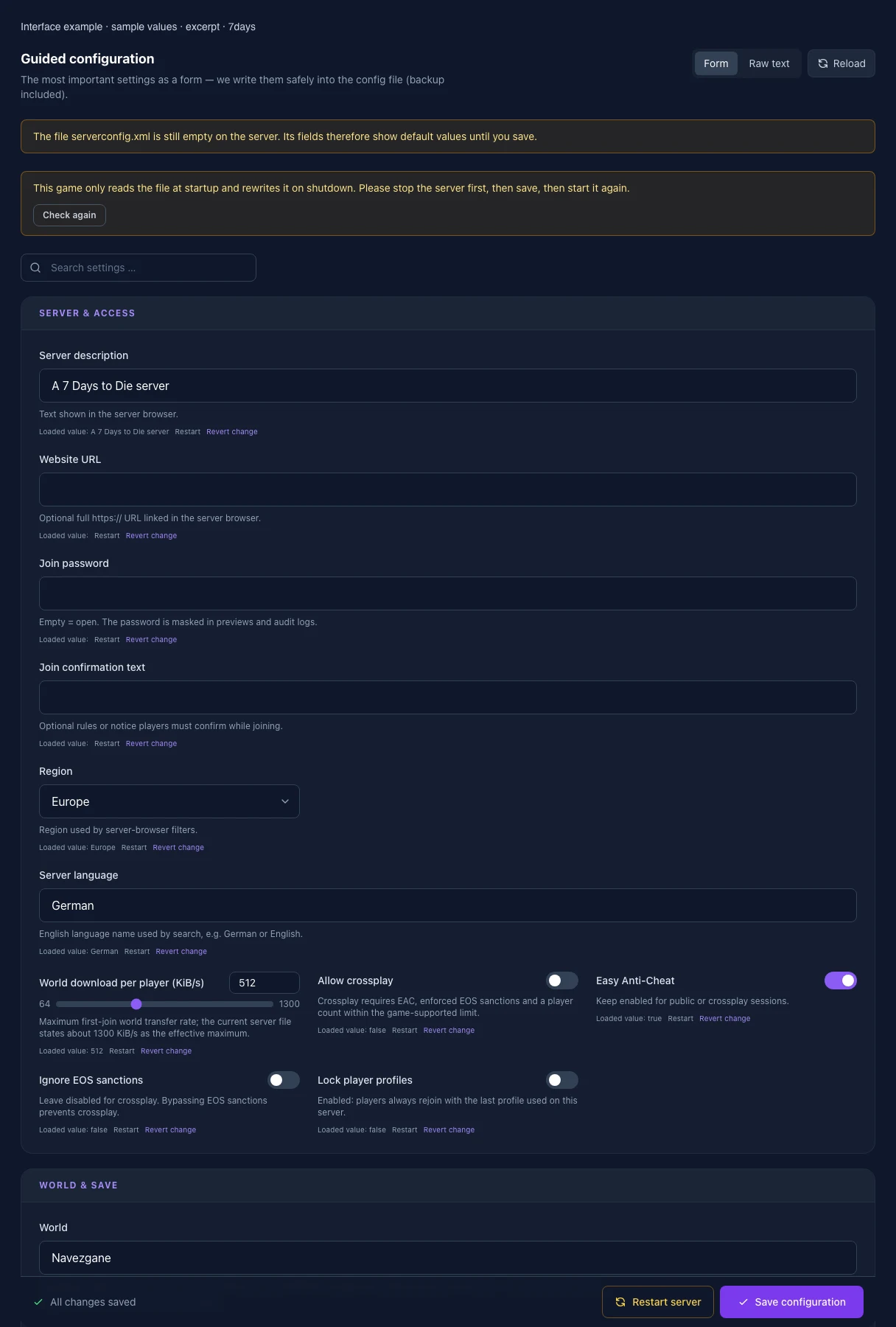
- Easy Anti-Cheat: Added
EACEnabled
Keep enabled for public or crossplay sessions.
After
- Setting
- EACEnabled
- Default
- true
- Save-game name: Added
GameName
Controls the save name. Do not change after a series starts; letters, digits, spaces and _-. are allowed.
After
- Setting
- GameName
- Default
- MyGame
- World: Added
GameWorld
Navezgane, RWG or the exact name of an existing world. WARNING: changing this loads/creates another save — back up the world first.
After
- Setting
- GameWorld
- Default
- Navezgane
- Land claims per player: Added
LandClaimCount
Maximum active land-claim blocks per player.
After
- Setting
- LandClaimCount
- Default
- 5
- Range / options
- 0 – 20
- Minimum distance between claims: Added
LandClaimDeadZone
Minimum block distance between claims owned by non-friends.
After
- Setting
- LandClaimDeadZone
- Default
- 30
- Range / options
- 0 – 200
- Claim decay mode: Added
LandClaimDecayMode
0 = slow/linear, 1 = fast/exponential, 2 = no decay until expiry.
After
- Setting
- LandClaimDecayMode
- Default
- 0
- Range / options
- 0, 1, 2
- Claim expiry (real days): Added
LandClaimExpiryTime
Offline time before protection expires.
After
- Setting
- LandClaimExpiryTime
- Default
- 7
- Range / options
- 0 – 365
- Offline hardness delay (min.): Added
LandClaimOfflineDelay
Minutes after logout before the offline hardness value applies.
After
- Setting
- LandClaimOfflineDelay
- Default
- 0
- Range / options
- 0 – 10080
- Offline claim hardness multiplier: Added
LandClaimOfflineDurabilityModifier
0 = indestructible; default 4 means four times block hardness.
After
- Setting
- LandClaimOfflineDurabilityModifier
- Default
- 4
- Range / options
- 0 – 32
- Online claim hardness multiplier: Added
LandClaimOnlineDurabilityModifier
0 = indestructible; default 4 means four times block hardness.
After
- Setting
- LandClaimOnlineDurabilityModifier
- Default
- 4
- Range / options
- 0 – 32
- Land-claim size: Added
LandClaimSize
Edge length of the protected area in blocks.
After
- Setting
- LandClaimSize
- Default
- 41
- Range / options
- 1 – 201
- Server language: Added
Language
English language name used by search, e.g. German or English.
After
- Setting
- Language
- Default
- German
- Reset unvisited chunks (game days): Added
MaxChunkAge
-1 = disabled. Otherwise long-unvisited, unprotected chunks can reset to their original state.
After
- Setting
- MaxChunkAge
- Default
- -1
- Range / options
- -1 – 3650
- Queued mesh layers: Added
MaxQueuedMeshLayers
Lower values save RAM but can slow chunk generation.
After
- Setting
- MaxQueuedMeshLayers
- Default
- 1000
- Range / options
- 100 – 4000
- Maximum spawned animals: Added
MaxSpawnedAnimals
World-wide animal limit. Higher values mainly help when many players are spread far apart.
After
- Setting
- MaxSpawnedAnimals
- Default
- 50
- Range / options
- 0 – 100
- Maximum spawned zombies: Added
MaxSpawnedZombies
World-wide limit with very high CPU impact; Blood Moon and sleepers apply additional internal scaling.
After
- Setting
- MaxSpawnedZombies
- Default
- 64
- Range / options
- 0 – 128
- Shared kill-XP range: Added
PartySharedKillRange
Maximum distance for shared party kill XP and quest-kill credit.
After
- Setting
- PartySharedKillRange
- Default
- 100
- Range / options
- 0 – 10000
- Lock player profiles: Added
PersistentPlayerProfiles
Enabled: players always rejoin with the last profile used on this server.
After
- Setting
- PersistentPlayerProfiles
- Default
- false
- Player killing (PvP): Added
PlayerKillingMode
0 = nobody, 1 = allies only, 2 = strangers only, 3 = everyone.
After
- Setting
- PlayerKillingMode
- Default
- 3
- Range / options
- 0, 1, 2, 3
- New-player safe zone (game hours): Added
PlayerSafeZoneHours
Duration of the enemy-free spawn zone in in-game hours.
After
- Setting
- PlayerSafeZoneHours
- Default
- 5
- Range / options
- 0 – 72
- New-player safe zone through level: Added
PlayerSafeZoneLevel
New players create an enemy-free spawn zone through this level.
After
- Setting
- PlayerSafeZoneLevel
- Default
- 5
- Range / options
- 0 – 300
- Region: Added
Region
Region used by server-browser filters.
After
- Setting
- Region
- Default
- Europe
- Range / options
- Europe, NorthAmericaEast, NorthAmericaWest, CentralAmerica, SouthAmerica, Russia, Asia, MiddleEast, Africa, Oceania
- Sandbox code (V3.1+): Added
SandboxCode
Controls 150+ rules including difficulty, XP, day length, loot, zombie behaviour and Blood Moon. In the CURRENT 7DTD client open New Game → Sandbox Options, configure everything, choose Copy Code, then paste it here. Do not reuse legacy guide properties. Re-check/copy it after every game update: an invalid code can reset some or all settings to defaults.
After
- Setting
- SandboxCode
- Default
- AAAJABJACJADJARFBNC
- Per-save data limit (MB): Added
SaveDataLimit
-1 = disabled. At the limit the game may forcibly reset saved chunks — enable only deliberately.
After
- Setting
- SaveDataLimit
- Default
- -1
- Range / options
- -1 – 102400
- Allow crossplay: Added
ServerAllowCrossplay
Crossplay requires EAC, enforced EOS sanctions and a player count within the game-supported limit.
After
- Setting
- ServerAllowCrossplay
- Default
- false
- Server description: Added
ServerDescription
Text shown in the server browser.
After
- Setting
- ServerDescription
- Default
- A 7 Days to Die server
- Join confirmation text: Added
ServerLoginConfirmationText
Optional rules or notice players must confirm while joining.
After
- Setting
- ServerLoginConfirmationText
- Default
- Maximum view distance: Added
ServerMaxAllowedViewDistance
6–12; high values noticeably increase RAM and CPU usage.
After
- Setting
- ServerMaxAllowedViewDistance
- Default
- 12
- Range / options
- 6 – 12
- World download per player (KiB/s): Added
ServerMaxWorldTransferSpeedKiBs
Maximum first-join world transfer rate; the current server file states about 1300 KiB/s as the effective maximum.
After
- Setting
- ServerMaxWorldTransferSpeedKiBs
- Default
- 512
- Range / options
- 64 – 1300
- Website URL: Added
ServerWebsiteURL
Optional full https:// URL linked in the server browser.
After
- Setting
- ServerWebsiteURL
- Default
- RWG seed: Added
WorldGenSeed
Only for GameWorld=RWG. Do not change after a series starts or another world may be selected.
After
- Setting
- WorldGenSeed
- Default
- MyGame
- RWG world size: Added
WorldGenSize
Officially supported edge length. Larger worlds need considerably more generation time, RAM and disk.
After
- Setting
- WorldGenSize
- Default
- 6144
- Range / options
- 6144, 8192, 10240