Game updates, plugin versions and improvements to our interface with a traceable history.
Recorded, available and installed are different states. Your actual installation status and suitable updates are shown in the server panel.
InterfaceChange documented
Guided startup parameters: revised
The guided tools were revised in the shared panel code. The entry concerns the interface or its processing. The date records the change; availability on an individual server depends on the game, software, plugins and permissions.
InterfaceChange documented
Guided startup parameters: revised
The guided tools were revised in the shared panel code. The entry concerns the interface or its processing. The date records the change; availability on an individual server depends on the game, software, plugins and permissions.
InterfaceChange documented
Guided startup parameters: revised
The guided tools were revised in the shared panel code. The entry concerns the interface or its processing. The date records the change; availability on an individual server depends on the game, software, plugins and permissions.
Developer announcementPublished
The Legacy of the Giant-Kings: Part Two Is Out Now!
Announcement from the official source. The source describes the changes; your server installation status is shown separately in the update center.
The guided tools were revised in the shared panel code. The entry concerns the interface or its processing. The date records the change; availability on an individual server depends on the game, software, plugins and permissions.
InterfaceChange documented
Guided startup parameters: revised
The guided tools were revised in the shared panel code. The entry concerns the interface or its processing. The date records the change; availability on an individual server depends on the game, software, plugins and permissions.
InterfaceChange documented
Guided startup parameters: revised
The guided tools were revised in the shared panel code. The entry concerns the interface or its processing. The date records the change; availability on an individual server depends on the game, software, plugins and permissions.
InterfaceChange documented
Guided startup parameters: revised
The guided tools were revised in the shared panel code. The entry concerns the interface or its processing. The date records the change; availability on an individual server depends on the game, software, plugins and permissions.
InterfaceChange documented
Guided startup parameters: revised
The guided tools were revised in the shared panel code. The entry concerns the interface or its processing. The date records the change; availability on an individual server depends on the game, software, plugins and permissions.
InterfaceChange documented
Guided startup parameters: revised
The guided tools were revised in the shared panel code. The entry concerns the interface or its processing. The date records the change; availability on an individual server depends on the game, software, plugins and permissions.
Developer announcementPublished
The Autum Sale 2026 is here!
Announcement from the official source. The source describes the changes; your server installation status is shown separately in the update center.
Announcement from the official source. The source describes the changes; your server installation status is shown separately in the update center.
Effects on plugins
No independent plugin compatibility test is documented for this announcement. Check the affected plugins in the update center before changing game versions.
The guided tools were revised in the shared panel code. The entry concerns the interface or its processing. The date records the change; availability on an individual server depends on the game, software, plugins and permissions.
InterfaceChange documented
Guided startup parameters: revised
The guided tools were revised in the shared panel code. The entry concerns the interface or its processing. The date records the change; availability on an individual server depends on the game, software, plugins and permissions.
InterfaceChange documented
Guided startup parameters: revised
The guided tools were revised in the shared panel code. The entry concerns the interface or its processing. The date records the change; availability on an individual server depends on the game, software, plugins and permissions.
InterfaceChange documented
Guided startup parameters: revised
The guided tools were revised in the shared panel code. The entry concerns the interface or its processing. The date records the change; availability on an individual server depends on the game, software, plugins and permissions.
InterfaceChange documented
Guided startup parameters: revised
The guided tools were revised in the shared panel code. The entry concerns the interface or its processing. The date records the change; availability on an individual server depends on the game, software, plugins and permissions.
InterfaceChange documented
Guided startup parameters: revised
The guided tools were revised in the shared panel code. The entry concerns the interface or its processing. The date records the change; availability on an individual server depends on the game, software, plugins and permissions.
InterfaceChange documented
Guided startup parameters: revised
The guided tools were revised in the shared panel code. The entry concerns the interface or its processing. The date records the change; availability on an individual server depends on the game, software, plugins and permissions.
InterfaceChange documented
Guided startup parameters: revised
The guided tools were revised in the shared panel code. The entry concerns the interface or its processing. The date records the change; availability on an individual server depends on the game, software, plugins and permissions.
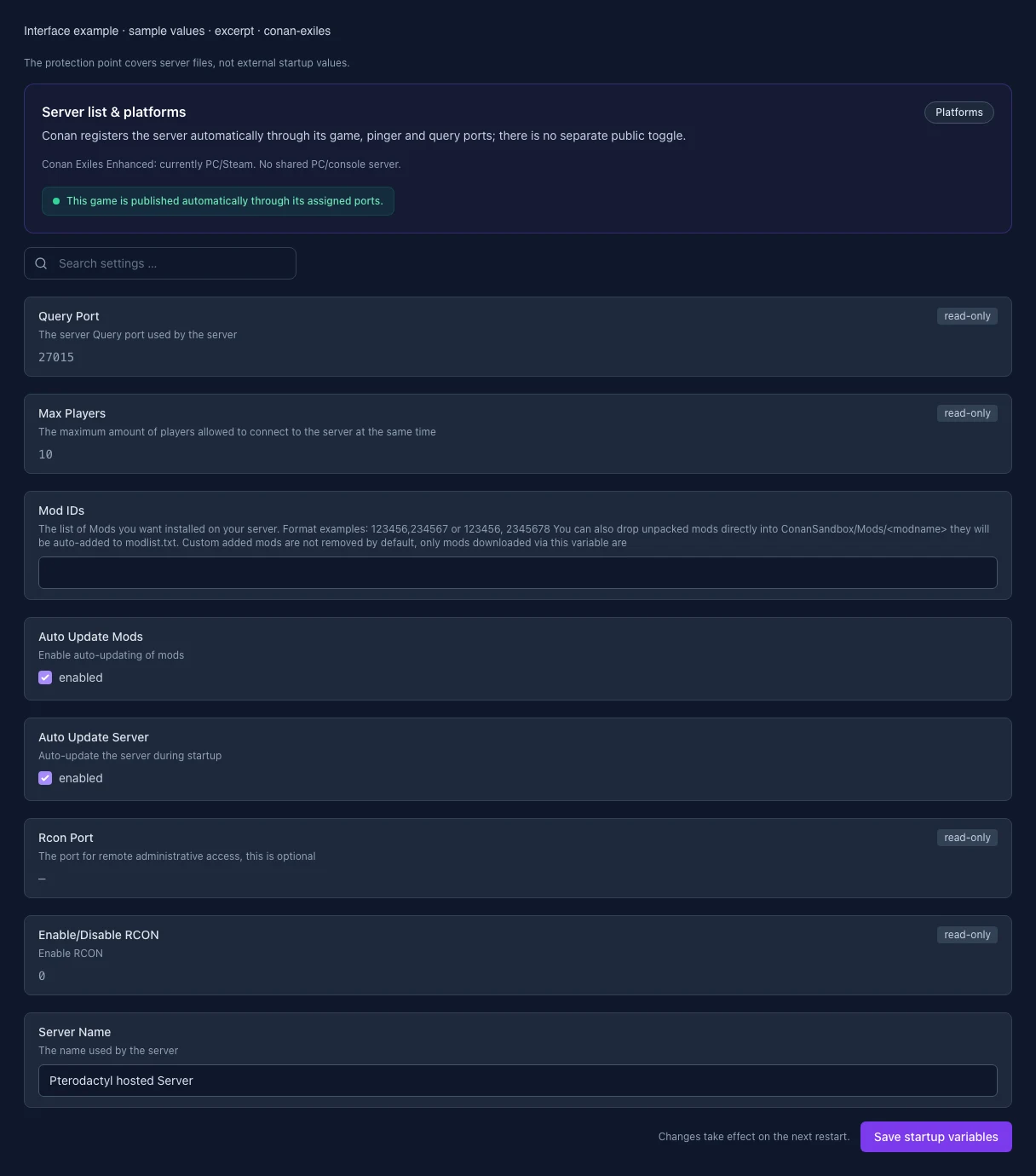
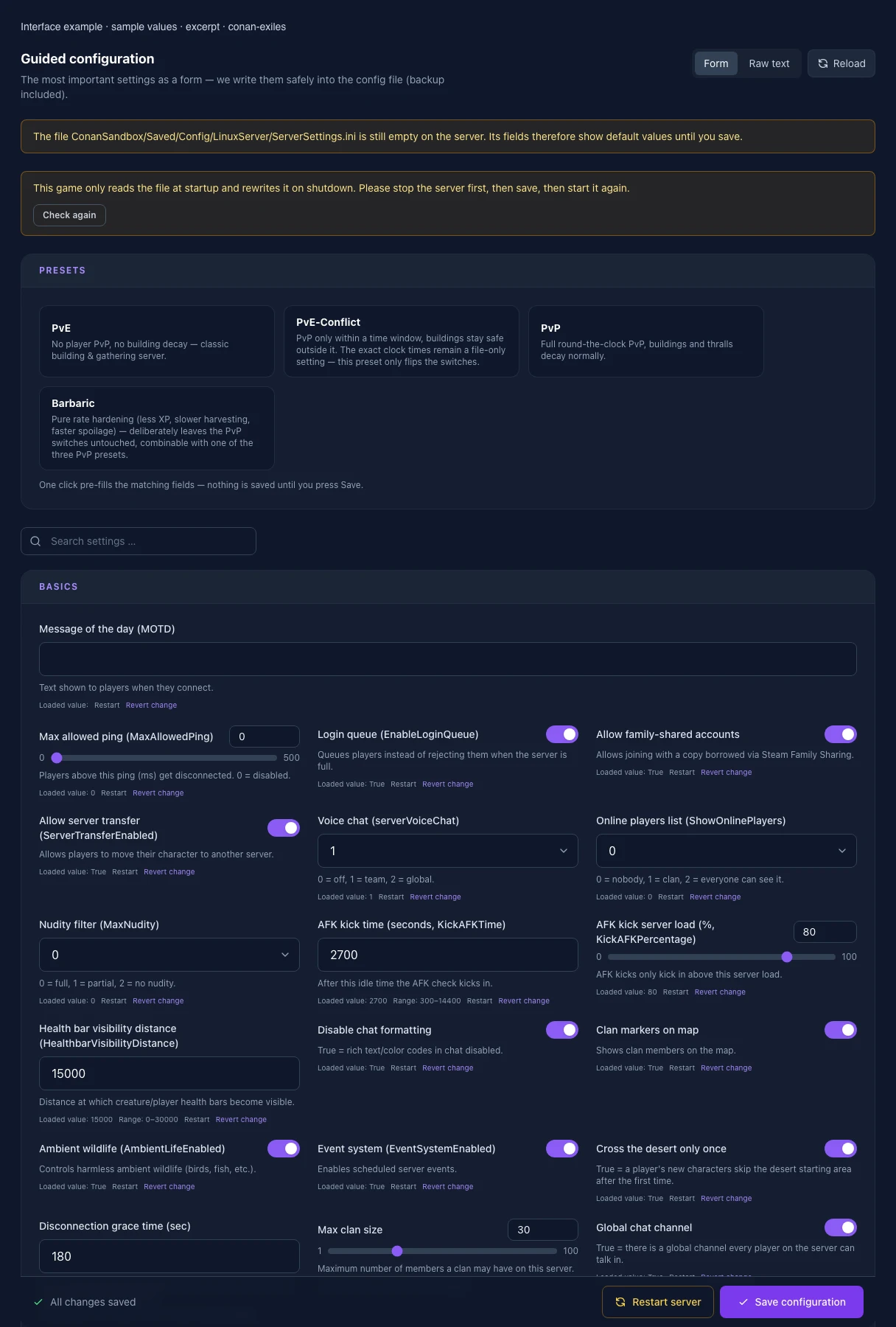
What the interface looks like
The image shows the interface on its capture date; earlier versions may differ.
Excerpt of the current interface with sample values. Values and prerequisites illustrate the controls; available tools depend on server software, plugins and permissions. · Captured on 2026-10-08Excerpt of the current interface with sample values. Values and prerequisites illustrate the controls; available tools depend on server software, plugins and permissions. · Captured on 2026-10-08
What the settings do
These values come from our guided editors. Defaults are the editor starting values; they do not show the contents of a customer server.
Message of the day (MOTD)
Text shown to players when they connect.
Setting
ServerMessageOfTheDay
Default
Max allowed ping (MaxAllowedPing)
Players above this ping (ms) get disconnected. 0 = disabled.
Setting
MaxAllowedPing
Default
0
Range / options
0 – 500
Login queue (EnableLoginQueue)
Queues players instead of rejecting them when the server is full.
Setting
EnableLoginQueue
Default
True
Allow family-shared accounts
Allows joining with a copy borrowed via Steam Family Sharing.
Setting
AllowFamilySharedAccount
Default
True
Allow server transfer (ServerTransferEnabled)
Allows players to move their character to another server.
Setting
ServerTransferEnabled
Default
True
Voice chat (serverVoiceChat)
0 = off, 1 = team, 2 = global.
Setting
serverVoiceChat
Default
1
Range / options
0, 1, 2
Online players list (ShowOnlinePlayers)
0 = nobody, 1 = clan, 2 = everyone can see it.
Setting
ShowOnlinePlayers
Default
0
Range / options
0, 1, 2
Nudity filter (MaxNudity)
0 = full, 1 = partial, 2 = no nudity.
Setting
MaxNudity
Default
0
Range / options
0, 1, 2
AFK kick time (seconds, KickAFKTime)
After this idle time the AFK check kicks in.
Setting
KickAFKTime
Default
2700
Range / options
300 – 14400
AFK kick server load (%, KickAFKPercentage)
AFK kicks only kick in above this server load.
Setting
KickAFKPercentage
Default
80
Range / options
0 – 100
Health bar visibility distance (HealthbarVisibilityDistance)
Distance at which creature/player health bars become visible.
Multiplier for harvested resource amount. Not in the default file — created on first save.
Setting
HarvestAmountMultiplier
Default
1
Range / options
0.1 – 10
Resource respawn speed
How fast harvested resources respawn.
Setting
ResourceRespawnSpeedMultiplier
Default
1
Range / options
0.1 – 10
Durability multiplier
How long weapons, tools and armor last before wearing out.
Setting
DurabilityMultiplier
Default
1
Range / options
0.1 – 10
Spoil rate (ItemSpoilRateScale)
Multiplier for how fast perishable items spoil.
Setting
ItemSpoilRateScale
Default
1
Range / options
0 – 10
Conversion speed (ItemConvertionMultiplier)
Multiplier for conversion processes (e.g. fermentation, compost).
Setting
ItemConvertionMultiplier
Default
1
Range / options
0.1 – 10
Thrall conversion speed
Multiplier for thrall conversion time at the Wheel of Pain.
Setting
ThrallConversionMultiplier
Default
1
Range / options
0.1 – 10
Fuel burn time
Multiplier for how long fuel burns in furnaces.
Setting
FuelBurnTimeMultiplier
Default
1
Range / options
0.1 – 10
Crafting cost multiplier
Multiplier for resource consumption when crafting.
Setting
CraftingCostMultiplier
Default
1
Range / options
0 – 10
Animal pen breeding time
Multiplier for breeding time in animal pens.
Setting
AnimalPenCraftingTimeMultiplier
Default
1
Range / options
0.1 – 10
Minimum durability after repair
Durability floor below which an item can no longer be repaired (fraction 0–1).
Setting
ItemRepairMinimumDurability
Default
0.1
Range / options
0 – 1
Repair penalty chance
Chance that a repair costs extra durability (fraction 0–1).
Setting
ItemRepairDurabilityLossPenaltyChance
Default
1
Range / options
0 – 1
Craft-from-storage radius
Range within which storage is tapped while crafting.
Setting
CraftFromStorageRadius
Default
4000
Range / options
0 – 20000
Build-from-storage radius
Range within which storage is tapped while building.
Setting
BuildFromStorageRadius
Default
4000
Range / options
0 – 20000
Build-from-storage radius (PvP)
Same as CraftFromStorageRadius, but specific to PvP servers.
Setting
PVPBuildFromStorageRadius
Default
600
Range / options
0 – 20000
Personal craft-from-storage radius
Range for accessing personal (bank) storage while crafting.
Setting
PersonalCraftFromStorageRadius
Default
4000
Range / options
0 – 20000
Containers ignore ownership
True = any clan member can use storage containers, regardless of owner.
Setting
ContainersIgnoreOwnership
Default
True
Encumbrance multiplier
Multiplier for players' max carry weight.
Setting
PlayerEncumbranceMultiplier
Default
1
Range / options
0.1 – 10
Overweight penalty multiplier
Multiplier for the movement penalty when overweight.
Setting
PlayerEncumbrancePenaltyMultiplier
Default
1
Range / options
0 – 10
Movement speed
Scales players' base movement speed.
Setting
PlayerMovementSpeedScale
Default
1
Range / options
0.1 – 5
Sprint speed
Scales players' sprint speed.
Setting
PlayerSprintSpeedScale
Default
1
Range / options
0.1 – 5
Stamina cost multiplier
Multiplier for general stamina consumption.
Setting
PlayerStaminaCostMultiplier
Default
1
Range / options
0 – 10
Stamina cost while sprinting
Multiplier for stamina consumption while sprinting.
Setting
PlayerStaminaCostSprintMultiplier
Default
1
Range / options
0 – 10
Health regeneration
Scales the speed of health regeneration.
Setting
PlayerHealthRegenSpeedScale
Default
1
Range / options
0 – 10
Stamina regeneration
Scales the speed of stamina regeneration.
Setting
PlayerStaminaRegenSpeedScale
Default
1
Range / options
0 – 10
Stamina regeneration time (sec)
Time until stamina is fully regenerated.
Setting
StaminaRegenerationTime
Default
3.75
Range / options
0.1 – 30
Exhaustion time (sec)
How long exhaustion lasts after stamina hits zero.
Setting
StaminaExhaustionTime
Default
3.75
Range / options
0.1 – 30
Stationary stamina regen rate
Multiplier for stamina regen while standing still.
Setting
StaminaStaticRegenRateMultiplier
Default
1
Range / options
0 – 10
Moving stamina regen rate
Multiplier for stamina regen while moving.
Setting
StaminaMovingRegenRateMultiplier
Default
1
Range / options
0 – 10
Regen pause after stamina use (sec)
Delay before stamina starts regenerating again after an action.
Setting
StaminaOnConsumeRegenPause
Default
1.10000002
Range / options
0 – 30
Regen pause after exhaustion (sec)
Delay before stamina regenerates again after full exhaustion.
Setting
StaminaOnExhaustionRegenPause
Default
2
Range / options
0 – 30
Hunger while active
How fast active players consume food. Lower = get hungry slower.
Setting
PlayerActiveHungerMultiplier
Default
1
Range / options
0 – 10
Thirst while active
How fast active players consume water. Lower = get thirsty slower.
Setting
PlayerActiveThirstMultiplier
Default
1
Range / options
0 – 10
Hunger while idle
How fast idle players consume food.
Setting
PlayerIdleHungerMultiplier
Default
1
Range / options
0 – 10
Thirst while idle
How fast idle players consume water.
Setting
PlayerIdleThirstMultiplier
Default
1
Range / options
0 – 10
Corruption gain multiplier
Multiplier for players' corruption gain.
Setting
PlayerCorruptionGainMultiplier
Default
1
Range / options
0 – 10
Corruption gain from sorcery
Multiplier for corruption gained from casting sorcery.
Setting
PlayerCorruptionGainFromSorceryMultiplier
Default
1
Range / options
0 – 10
Thrall corruption removal
Multiplier for corruption removal on thralls.
Setting
ThrallCorruptionRemovalMultiplier
Default
1
Range / options
0 – 10
Unconscious time (sec)
How long a knocked-out character stays unconscious.
Setting
UnconsciousTimeSeconds
Default
1800
Range / options
60 – 7200
Offline unconscious body lifetime (hours)
How long offline unconscious player bodies persist.
Setting
OfflinePlayersUnconsciousBodiesHours
Default
168
Range / options
0 – 720
Drop equipment on death
What a player loses on death: DropEverything = everything, DropBackpack = backpack only (worn gear stays), DropNothing = nothing.
Setting
DropEquipmentOnDeath
Default
DropEverything
Range / options
DropEverything, DropBackpack, DropNothing
Everybody can loot corpses
True = anybody can loot a dead player's corpse. False = only the player can recover their own items.
Setting
EverybodyCanLootCorpse
Default
False
Characters remain in world after logout
True = logged-out players remain in the world unconscious and can be attacked.
Setting
LogoutCharactersRemainInTheWorld
Default
True
Death map markers
How many death locations stay marked on the map at once. 0 = no markers.
Setting
MaxDeathMapMarkers
Default
3
Range / options
0 – 20
Corpses per player
Max number of simultaneous corpses per player (prevents loot loss).
Setting
CorpsesPerPlayer
Default
10
Range / options
0 – 50
Player corpse lifetime (sec)
How long player corpses with loot persist.
Setting
PlayerCorpseLifeTime
Default
1800
Range / options
60 – 86400
NPC corpse lifetime (sec)
How long NPC/creature corpses persist.
Setting
NPCCorpseLifeTime
Default
600
Range / options
60 – 86400
Base thrall population limit
Base value for the max number of thralls/followers on the server.
Setting
MinionPopulationBaseValue
Default
50
Range / options
0 – 500
Extra thralls per player
How many extra thralls each player adds to the limit.
Setting
MinionPopulationPerPlayer
Default
5
Range / options
0 – 100
Thrall population limit enabled
True = the server enforces the thrall population limit.
Setting
UseMinionPopulationLimit
Default
False
Allowed overpopulation
Tolerance for how far the limit may be exceeded.
Setting
MinionOverpopulationAllowed
Default
10
Range / options
0 – 100
Overpopulation cleanup interval (min)
How often excess thralls are removed during overpopulation.
Setting
MinionOverpopulationCleanup
Default
60
Range / options
0 – 1440
NPC health multiplier
Multiplier for max health of NPCs/creatures.
Setting
NPCHealthMultiplier
Default
1
Range / options
0.1 – 10
NPC respawn multiplier
Multiplier for NPC respawn speed.
Setting
NPCRespawnMultiplier
Default
1
Range / options
0.1 – 10
NPC max spawn cap multiplier
Multiplier for the max number of concurrent NPCs.
Setting
NPCMaxSpawnCapMultiplier
Default
1
Range / options
0.1 – 10
Thrall exclusion radius
Radius around land claims where no wild thralls spawn.
Setting
ThrallExclusionRadius
Default
100
Range / options
0 – 2000
Scouting time (min)
Time until a scout thrall reports a target.
Setting
ThrallScoutingTimeMinutes
Default
10
Range / options
1 – 120
Min distance from home
Minimum distance at which thralls count as "stranded".
Setting
ThrallMinDistanceAwayFromHome
Default
5000
Range / options
0 – 50000
Thrall teleport cooldown (sec)
Cooldown before a stuck thrall gets teleported back.
Setting
ThrallTeleportingCooldown
Default
10
Range / options
0 – 600
Follower down-but-not-out
True = followers get knocked out instead of dying immediately.
Setting
EnableFollowerDbno
Default
True
Rescue only on own land claim
True = knocked-out followers can only be rescued on your own land claim.
Setting
EnableFollowerRescueOnLandClaimOnly
Default
True
Rescue in build-exclusion zone
True = follower rescue is also allowed in build-exclusion zones.
Setting
EnableFollowerRescueInBuildExclusionZone
Default
False
Follower rescue cooldown (sec)
Cooldown between two rescues of the same follower.
Setting
FollowerRescueCooldown
Default
3600
Range / options
0 – 86400
Feed box range
Multiplier for the range at which feed boxes supply thralls/animals.
Setting
FeedBoxRangeMultiplier
Default
1
Range / options
0.1 – 10
NPC camps ignore land claim
True = NPC camps can respawn even on claimed land.
Setting
CampsIgnoreLandclaim
Default
True
Cooldown before follower rescue (sec)
How long after the last damage you must wait before a downed follower can be rescued.
Setting
DamageCooldownBeforeRescue
Default
600
Range / options
0 – 7200
Structure damage multiplier
Multiplier for damage dealt to building structures.
Setting
StructureDamageMultiplier
Default
1
Range / options
0 – 10
Structure health multiplier
Multiplier for building structures' health points.
Setting
StructureHealthMultiplier
Default
1
Range / options
0.1 – 10
Building damage multiplier
General multiplier for damage dealt to buildings.
Setting
BuildingDamageMultiplier
Default
1
Range / options
0 – 10
Stability loss multiplier
Multiplier for how fast building pieces lose stability.
Setting
StabilityLossMultiplier
Default
1
Range / options
0 – 10
Land claim radius multiplier
Multiplier for the radius of land claims.
Setting
LandClaimRadiusMultiplier
Default
1
Range / options
0.1 – 10
Disable land claim notifications
True = no chat notification for land claim conflicts.
Setting
DisableLandclaimNotifications
Default
True
Allow building anywhere
True = land-claim rules for build placement are ignored.
Setting
AllowBuildingAnywhere
Default
False
Building pickup
True = freshly placed building pieces can be picked back up briefly.
Setting
BuildingPickupEnabled
Default
True
Disable building abandonment
True = buildings do NOT decay from owner inactivity.
Setting
DisableBuildingAbandonment
Default
True
Max building decay time (sec)
Upper bound for time until buildings decay.
Setting
MaxBuildingDecayTime
Default
1296000
Range / options
3600 – 2592000
Time to auto-demolish (sec)
Time after decay starts until a building is auto-demolished.
Setting
MaxDecayTimeToAutoDemolish
Default
604800
Range / options
0 – 2592000
Decay time per building score point
Extra decay time granted per structure building-score point.
Setting
BuildingDecayTimePerScore
Default
5400
Range / options
0 – 86400
Decay time multiplier
Multiplier for the overall building decay time.
Setting
BuildingDecayTimeMultiplier
Default
1
Range / options
0 – 10
Cleanup time multiplier after decay
Multiplier for the time until decayed buildings are finally cleaned up.
Setting
DecayCleanupTimeMultiplier
Default
2
Range / options
0 – 10
Decay bonus time rate
Bonus time credited to the decay timer by player activity.
Setting
DecayBonusTimeRate
Default
600
Range / options
0 – 86400
Show building score
True = shows the building-score value when inspecting building pieces.
Setting
DecayShowBuildingScore
Default
False
Thrall decay time (sec)
Time until placed thralls decay from inactivity.
Setting
ThrallDecayTime
Default
1296000
Range / options
3600 – 2592000
Disable thrall decay
True = placed thralls do NOT decay from inactivity.
Setting
DisableThrallDecay
Default
True
Point-of-interest build protection
True = building is blocked at points of interest (dungeons, ruins, cities).
Setting
PoiProtectionEnabled
Default
False
Day/night cycle speed
Overall speed of the day/night cycle. Not in the default file — created on first save.
Setting
DayCycleSpeedScale
Default
1
Range / options
0.1 – 10
Daytime speed
Speed at which the daytime phase passes.
Setting
DayTimeSpeedScale
Default
1
Range / options
0.1 – 10
Nighttime speed
Speed at which the nighttime phase passes.
Setting
NightTimeSpeedScale
Default
1
Range / options
0.1 – 10
Dawn/dusk speed
Speed of the dawn/dusk transition phases.
Setting
DawnDuskSpeedScale
Default
1
Range / options
0.1 – 10
Client catch-up time
True = client clock quickly catches up to server time after reconnecting.
Setting
UseClientCatchUpTime
Default
True
Monday — PvP enabled
Only takes effect while the time restriction above is switched on.
Setting
PVPEnabledMonday
Default
False
Monday — PvP from (hour)
Whole hour in server time, 0–24.
Setting
PVPTimeMondayStart
Default
0
Range / options
0 – 24
Monday — PvP to (hour)
Whole hour in server time, 0–24.
Setting
PVPTimeMondayEnd
Default
0
Range / options
0 – 24
Monday — Building damage enabled
Only takes effect while the time restriction above is switched on.
Setting
PVPBuildingDamageEnabledMonday
Default
False
Monday — Building damage from (hour)
Whole hour in server time, 0–24.
Setting
PVPBuildingDamageTimeMondayStart
Default
0
Range / options
0 – 24
Monday — Building damage to (hour)
Whole hour in server time, 0–24.
Setting
PVPBuildingDamageTimeMondayEnd
Default
0
Range / options
0 – 24
Tuesday — PvP enabled
Only takes effect while the time restriction above is switched on.
Setting
PVPEnabledTuesday
Default
False
Tuesday — PvP from (hour)
Whole hour in server time, 0–24.
Setting
PVPTimeTuesdayStart
Default
0
Range / options
0 – 24
Tuesday — PvP to (hour)
Whole hour in server time, 0–24.
Setting
PVPTimeTuesdayEnd
Default
0
Range / options
0 – 24
Tuesday — Building damage enabled
Only takes effect while the time restriction above is switched on.
Setting
PVPBuildingDamageEnabledTuesday
Default
False
Tuesday — Building damage from (hour)
Whole hour in server time, 0–24.
Setting
PVPBuildingDamageTimeTuesdayStart
Default
0
Range / options
0 – 24
Tuesday — Building damage to (hour)
Whole hour in server time, 0–24.
Setting
PVPBuildingDamageTimeTuesdayEnd
Default
0
Range / options
0 – 24
Wednesday — PvP enabled
Only takes effect while the time restriction above is switched on.
Setting
PVPEnabledWednesday
Default
False
Wednesday — PvP from (hour)
Whole hour in server time, 0–24.
Setting
PVPTimeWednesdayStart
Default
0
Range / options
0 – 24
Wednesday — PvP to (hour)
Whole hour in server time, 0–24.
Setting
PVPTimeWednesdayEnd
Default
0
Range / options
0 – 24
Wednesday — Building damage enabled
Only takes effect while the time restriction above is switched on.
Setting
PVPBuildingDamageEnabledWednesday
Default
False
Wednesday — Building damage from (hour)
Whole hour in server time, 0–24.
Setting
PVPBuildingDamageTimeWednesdayStart
Default
0
Range / options
0 – 24
Wednesday — Building damage to (hour)
Whole hour in server time, 0–24.
Setting
PVPBuildingDamageTimeWednesdayEnd
Default
0
Range / options
0 – 24
Thursday — PvP enabled
Only takes effect while the time restriction above is switched on.
Setting
PVPEnabledThursday
Default
False
Thursday — PvP from (hour)
Whole hour in server time, 0–24.
Setting
PVPTimeThursdayStart
Default
0
Range / options
0 – 24
Thursday — PvP to (hour)
Whole hour in server time, 0–24.
Setting
PVPTimeThursdayEnd
Default
0
Range / options
0 – 24
Thursday — Building damage enabled
Only takes effect while the time restriction above is switched on.
Setting
PVPBuildingDamageEnabledThursday
Default
False
Thursday — Building damage from (hour)
Whole hour in server time, 0–24.
Setting
PVPBuildingDamageTimeThursdayStart
Default
0
Range / options
0 – 24
Thursday — Building damage to (hour)
Whole hour in server time, 0–24.
Setting
PVPBuildingDamageTimeThursdayEnd
Default
0
Range / options
0 – 24
Friday — PvP enabled
Only takes effect while the time restriction above is switched on.
Setting
PVPEnabledFriday
Default
False
Friday — PvP from (hour)
Whole hour in server time, 0–24.
Setting
PVPTimeFridayStart
Default
0
Range / options
0 – 24
Friday — PvP to (hour)
Whole hour in server time, 0–24.
Setting
PVPTimeFridayEnd
Default
0
Range / options
0 – 24
Friday — Building damage enabled
Only takes effect while the time restriction above is switched on.
Setting
PVPBuildingDamageEnabledFriday
Default
False
Friday — Building damage from (hour)
Whole hour in server time, 0–24.
Setting
PVPBuildingDamageTimeFridayStart
Default
0
Range / options
0 – 24
Friday — Building damage to (hour)
Whole hour in server time, 0–24.
Setting
PVPBuildingDamageTimeFridayEnd
Default
0
Range / options
0 – 24
Saturday — PvP enabled
Only takes effect while the time restriction above is switched on.
Setting
PVPEnabledSaturday
Default
False
Saturday — PvP from (hour)
Whole hour in server time, 0–24.
Setting
PVPTimeSaturdayStart
Default
0
Range / options
0 – 24
Saturday — PvP to (hour)
Whole hour in server time, 0–24.
Setting
PVPTimeSaturdayEnd
Default
0
Range / options
0 – 24
Saturday — Building damage enabled
Only takes effect while the time restriction above is switched on.
Setting
PVPBuildingDamageEnabledSaturday
Default
False
Saturday — Building damage from (hour)
Whole hour in server time, 0–24.
Setting
PVPBuildingDamageTimeSaturdayStart
Default
0
Range / options
0 – 24
Saturday — Building damage to (hour)
Whole hour in server time, 0–24.
Setting
PVPBuildingDamageTimeSaturdayEnd
Default
0
Range / options
0 – 24
Sunday — PvP enabled
Only takes effect while the time restriction above is switched on.
Setting
PVPEnabledSunday
Default
False
Sunday — PvP from (hour)
Whole hour in server time, 0–24.
Setting
PVPTimeSundayStart
Default
0
Range / options
0 – 24
Sunday — PvP to (hour)
Whole hour in server time, 0–24.
Setting
PVPTimeSundayEnd
Default
0
Range / options
0 – 24
Sunday — Building damage enabled
Only takes effect while the time restriction above is switched on.
Setting
PVPBuildingDamageEnabledSunday
Default
False
Sunday — Building damage from (hour)
Whole hour in server time, 0–24.
Setting
PVPBuildingDamageTimeSundayStart
Default
0
Range / options
0 – 24
Sunday — Building damage to (hour)
Whole hour in server time, 0–24.
Setting
PVPBuildingDamageTimeSundayEnd
Default
0
Range / options
0 – 24
Undermesh detection
Detects players glitching below the world geometry — the most common cheat on PvP servers.
Setting
bUndermeshDetectionEnabled
Default
True
Undermesh detection tolerance
How long a player may stay below the world before detection acts. Lower = stricter.
Setting
AllowedTimeUndermesh
Default
1
Range / options
0 – 300
BattlEye anti-cheat
Locks out players without BattlEye. Can false-positive with mods — usually off on modded servers.
Setting
IsBattlEyeEnabled
Default
False
Building validation
Validates placed building pieces server-side against manipulated clients.
Setting
BuildingValidationEnabled
Default
False
Restrict avatar summoning to a time window
Gods may then only be summoned inside the window below.
Setting
RestrictAvatarSummoningTime
Default
False
Avatars on weekdays from (hour)
Whole hour in server time, 0–24.
Setting
AvatarSummoningTimeWeekdayStart
Default
0
Range / options
0 – 24
Avatars on weekdays to (hour)
Whole hour in server time, 0–24.
Setting
AvatarSummoningTimeWeekdayEnd
Default
0
Range / options
0 – 24
Avatars on weekends from (hour)
Whole hour in server time, 0–24.
Setting
AvatarSummoningTimeWeekendStart
Default
0
Range / options
0 – 24
Avatars on weekends to (hour)
Whole hour in server time, 0–24.
Setting
AvatarSummoningTimeWeekendEnd
Default
0
Range / options
0 – 24
Avatar dome damage
Damage factor of the protective dome against summoned gods.
Setting
AvatarDomeDamageMultiplier
Default
1
Range / options
0 – 10
Avatar dome duration
How long the protective dome stays up.
Setting
AvatarDomeDurationMultiplier
Default
1
Range / options
0.1 – 10
Allow Central Europe
Controls which regions players may join from.
Setting
RegionAllowCentralEurope
Default
True
Allow Western Europe
Controls which regions players may join from.
Setting
RegionAllowWesternEurope
Default
True
Allow Eastern Europe
Controls which regions players may join from.
Setting
RegionAllowEasternEurope
Default
True
Allow North America
Controls which regions players may join from.
Setting
RegionAllowNorthAmerica
Default
True
Allow South America
Controls which regions players may join from.
Setting
RegionAllowSouthAmerica
Default
True
Allow Asia
Controls which regions players may join from.
Setting
RegionAllowAsia
Default
True
Allow Oceania
Controls which regions players may join from.
Setting
RegionAllowOceania
Default
True
Allow Africa
Controls which regions players may join from.
Setting
RegionAllowAfrica
Default
True
Blocked regions (list)
Finer block list on top of the switches above. Leave empty if unused.
Setting
RegionBlockList
Default
Creative mode for everyone (CreativeModeServer)
1 = every player builds without material cost. For building and roleplay servers.
Setting
CreativeModeServer
Default
0
Range / options
0, 1
Building preload radius
How far ahead buildings are loaded. Higher = fewer pop-in stutters, more memory.
Setting
BuildingPreloadRadius
Default
80
Range / options
0 – 500
Building replication distance
Distance at which buildings are replicated to clients. 0 = engine default.
Setting
BuildingReplicationDistance
Default
0
Range / options
0 – 100000
Query Port
The server Query port used by the server
Setting
QUERY_PORT
Default
27015
Range / options
… – 65535
When it takes effect
Takes effect after saving and restarting the server.
Max Players
The maximum amount of players allowed to connect to the server at the same time
Setting
MAX_PLAYERS
Default
10
Range / options
1 – 70
When it takes effect
Takes effect after saving and restarting the server.
Mod IDs
The list of Mods you want installed on your server.
Format examples: 123456,234567 or 123456, 2345678
You can also drop unpacked mods directly into ConanSandbox/Mods/<modname> they will be auto-added to modlist.txt. Custom added mods are not removed by default, only mods downloaded via this variable are
Setting
MOD_IDS
Default
When it takes effect
Takes effect after saving and restarting the server.
Auto Update Mods
Enable auto-updating of mods
Setting
UPDATE_MODS
Default
1
When it takes effect
Takes effect after saving and restarting the server.
Auto Update Server
Auto-update the server during startup
Setting
AUTO_UPDATE
Default
1
When it takes effect
Takes effect after saving and restarting the server.
Server Name
The name used by the server
Setting
SERVER_NAME
Default
Pterodactyl hosted Server
When it takes effect
Takes effect after saving and restarting the server.
Loading...
Cookie settings
We use cookies to improve your experience and analyze our website.
Cookie settings
Essential cookies
Required
These cookies are required for the core functions of the website and cannot be disabled.
Analytics cookies
Help us understand how the website and customer area are used (our own usage analytics, Google Analytics, Microsoft Clarity).
Marketing cookies
Allow the pseudonymous matching of an ad click to an order in order to measure conversions.