Developer announcement
Published
Soulmask FAST Q&A 02
Announcement from the official source. The source describes the changes; your server installation status is shown separately in the update center.
Game updates, plugin versions and improvements to our interface with a traceable history.
Recorded, available and installed are different states. Your actual installation status and suitable updates are shown in the server panel.
Announcement from the official source. The source describes the changes; your server installation status is shown separately in the update center.
Announcement from the official source. The source describes the changes; your server installation status is shown separately in the update center.
No independent plugin compatibility test is documented for this announcement. Check the affected plugins in the update center before changing game versions.
Announcement from the official source. The source describes the changes; your server installation status is shown separately in the update center.
Announcement from the official source. The source describes the changes; your server installation status is shown separately in the update center.
No independent plugin compatibility test is documented for this announcement. Check the affected plugins in the update center before changing game versions.
Announcement from the official source. The source describes the changes; your server installation status is shown separately in the update center.
No independent plugin compatibility test is documented for this announcement. Check the affected plugins in the update center before changing game versions.
Announcement from the official source. The source describes the changes; your server installation status is shown separately in the update center.
No independent plugin compatibility test is documented for this announcement. Check the affected plugins in the update center before changing game versions.
Announcement from the official source. The source describes the changes; your server installation status is shown separately in the update center.
Announcement from the official source. The source describes the changes; your server installation status is shown separately in the update center.
Announcement from the official source. The source describes the changes; your server installation status is shown separately in the update center.
No independent plugin compatibility test is documented for this announcement. Check the affected plugins in the update center before changing game versions.
Announcement from the official source. The source describes the changes; your server installation status is shown separately in the update center.
Announcement from the official source. The source describes the changes; your server installation status is shown separately in the update center.
Announcement from the official source. The source describes the changes; your server installation status is shown separately in the update center.
Announcement from the official source. The source describes the changes; your server installation status is shown separately in the update center.
No independent plugin compatibility test is documented for this announcement. Check the affected plugins in the update center before changing game versions.
Announcement from the official source. The source describes the changes; your server installation status is shown separately in the update center.
Announcement from the official source. The source describes the changes; your server installation status is shown separately in the update center.
Announcement from the official source. The source describes the changes; your server installation status is shown separately in the update center.
No independent plugin compatibility test is documented for this announcement. Check the affected plugins in the update center before changing game versions.
Announcement from the official source. The source describes the changes; your server installation status is shown separately in the update center.
Announcement from the official source. The source describes the changes; your server installation status is shown separately in the update center.
Announcement from the official source. The source describes the changes; your server installation status is shown separately in the update center.
Announcement from the official source. The source describes the changes; your server installation status is shown separately in the update center.
No independent plugin compatibility test is documented for this announcement. Check the affected plugins in the update center before changing game versions.
The image shows the interface on its capture date; earlier versions may differ.
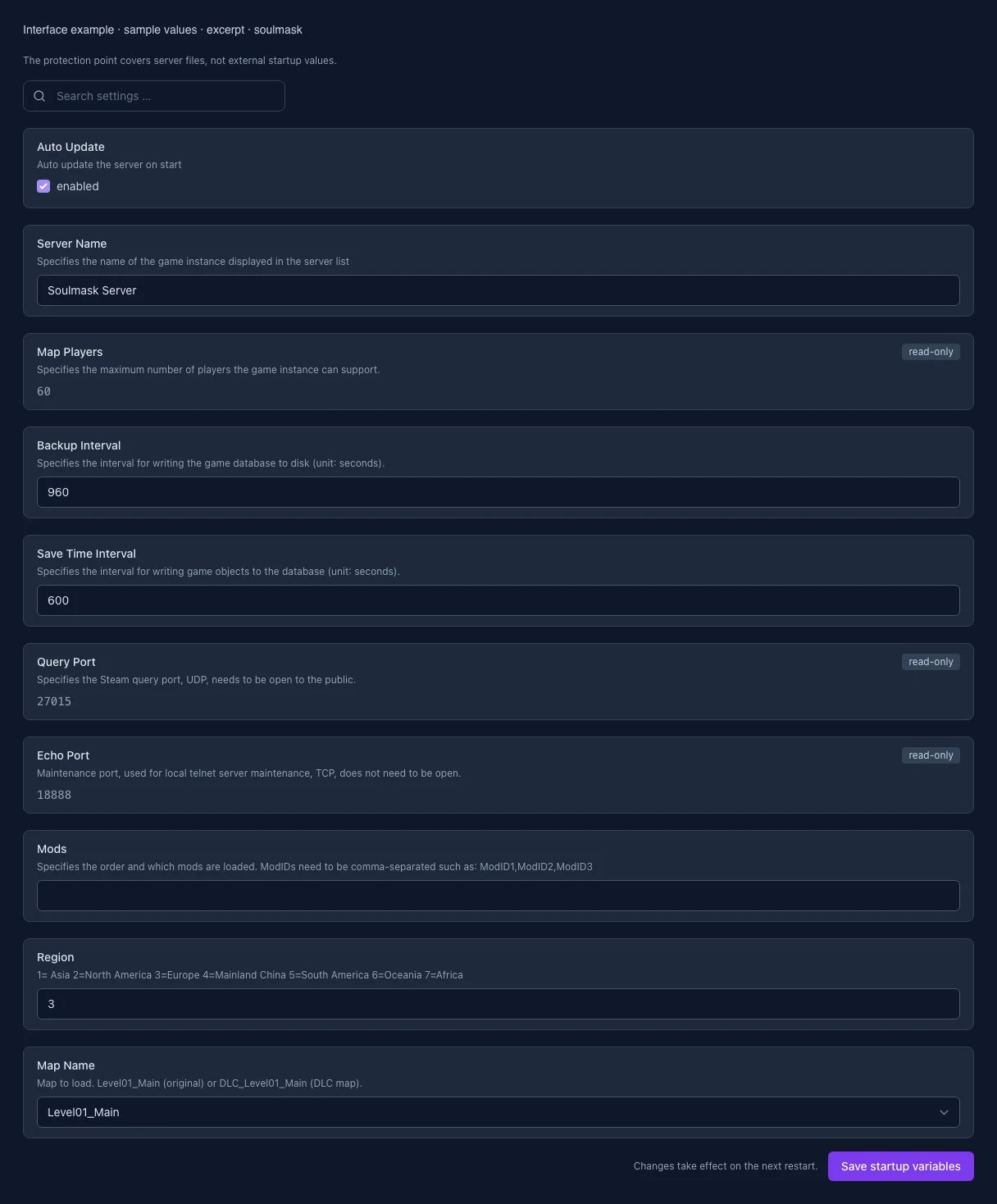
These values come from our guided editors. Defaults are the editor starting values; they do not show the contents of a customer server.
Auto update the server on start
Specifies the name of the game instance displayed in the server list
Specifies the maximum number of players the game instance can support.
Specifies the interval for writing the game database to disk (unit: seconds).
Specifies the interval for writing game objects to the database (unit: seconds).
Specifies the Steam query port, UDP, needs to be open to the public.
Maintenance port, used for local telnet server maintenance, TCP, does not need to be open.
Specifies the order and which mods are loaded. ModIDs need to be comma-separated such as: ModID1,ModID2,ModID3
1= Asia 2=North America 3=Europe 4=Mainland China 5=South America 6=Oceania 7=Africa
Map to load. Level01_Main (original) or DLC_Level01_Main (DLC map).