Developer announcement
Published
A20 Dev Stream Series Part 4
Announcement from the official source. The source describes the changes; your server installation status is shown separately in the update center.
Game updates, plugin versions and improvements to our interface with a traceable history.
Recorded, available and installed are different states. Your actual installation status and suitable updates are shown in the server panel.
Announcement from the official source. The source describes the changes; your server installation status is shown separately in the update center.
Announcement from the official source. The source describes the changes; your server installation status is shown separately in the update center.
Announcement from the official source. The source describes the changes; your server installation status is shown separately in the update center.
Announcement from the official source. The source describes the changes; your server installation status is shown separately in the update center.
Announcement from the official source. The source describes the changes; your server installation status is shown separately in the update center.
Announcement from the official source. The source describes the changes; your server installation status is shown separately in the update center.
No independent plugin compatibility test is documented for this announcement. Check the affected plugins in the update center before changing game versions.
Announcement from the official source. The source describes the changes; your server installation status is shown separately in the update center.
Announcement from the official source. The source describes the changes; your server installation status is shown separately in the update center.
No independent plugin compatibility test is documented for this announcement. Check the affected plugins in the update center before changing game versions.
Announcement from the official source. The source describes the changes; your server installation status is shown separately in the update center.
Announcement from the official source. The source describes the changes; your server installation status is shown separately in the update center.
No independent plugin compatibility test is documented for this announcement. Check the affected plugins in the update center before changing game versions.
Announcement from the official source. The source describes the changes; your server installation status is shown separately in the update center.
Announcement from the official source. The source describes the changes; your server installation status is shown separately in the update center.
Announcement from the official source. The source describes the changes; your server installation status is shown separately in the update center.
No independent plugin compatibility test is documented for this announcement. Check the affected plugins in the update center before changing game versions.
Announcement from the official source. The source describes the changes; your server installation status is shown separately in the update center.
Announcement from the official source. The source describes the changes; your server installation status is shown separately in the update center.
Announcement from the official source. The source describes the changes; your server installation status is shown separately in the update center.
Announcement from the official source. The source describes the changes; your server installation status is shown separately in the update center.
No independent plugin compatibility test is documented for this announcement. Check the affected plugins in the update center before changing game versions.
Announcement from the official source. The source describes the changes; your server installation status is shown separately in the update center.
No independent plugin compatibility test is documented for this announcement. Check the affected plugins in the update center before changing game versions.
Announcement from the official source. The source describes the changes; your server installation status is shown separately in the update center.
Announcement from the official source. The source describes the changes; your server installation status is shown separately in the update center.
No independent plugin compatibility test is documented for this announcement. Check the affected plugins in the update center before changing game versions.
The image shows the interface on its capture date; earlier versions may differ.
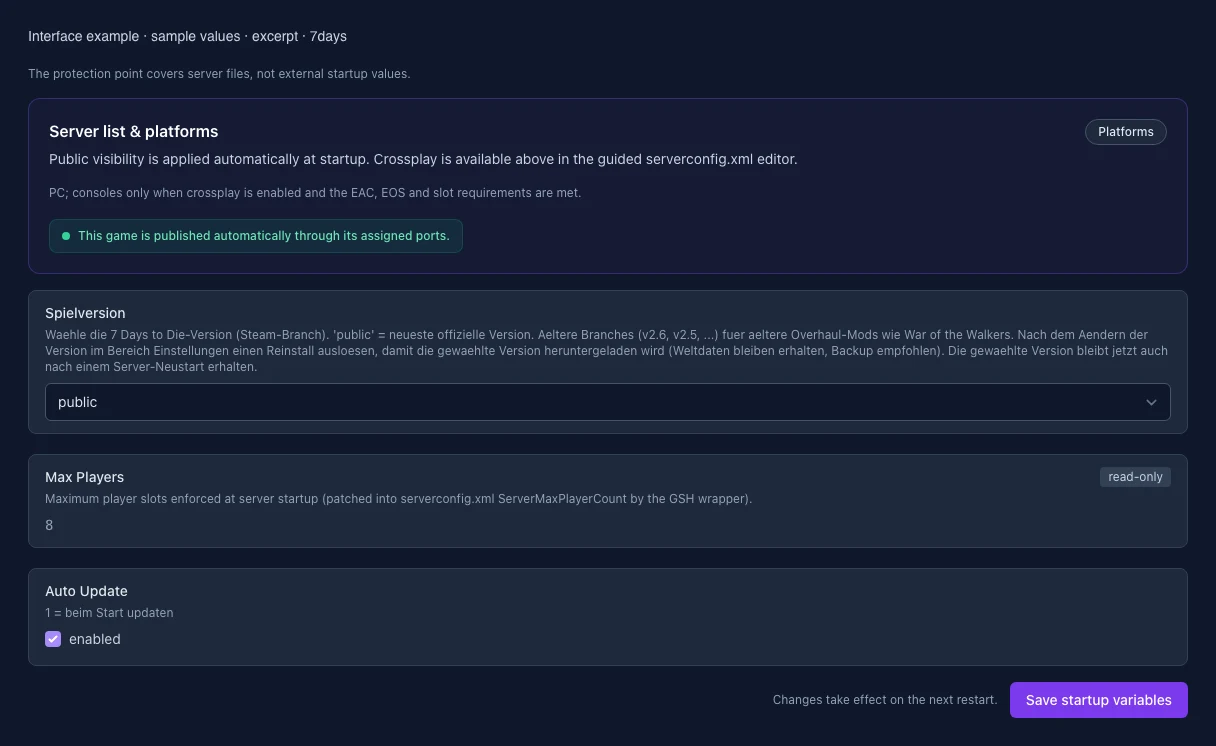
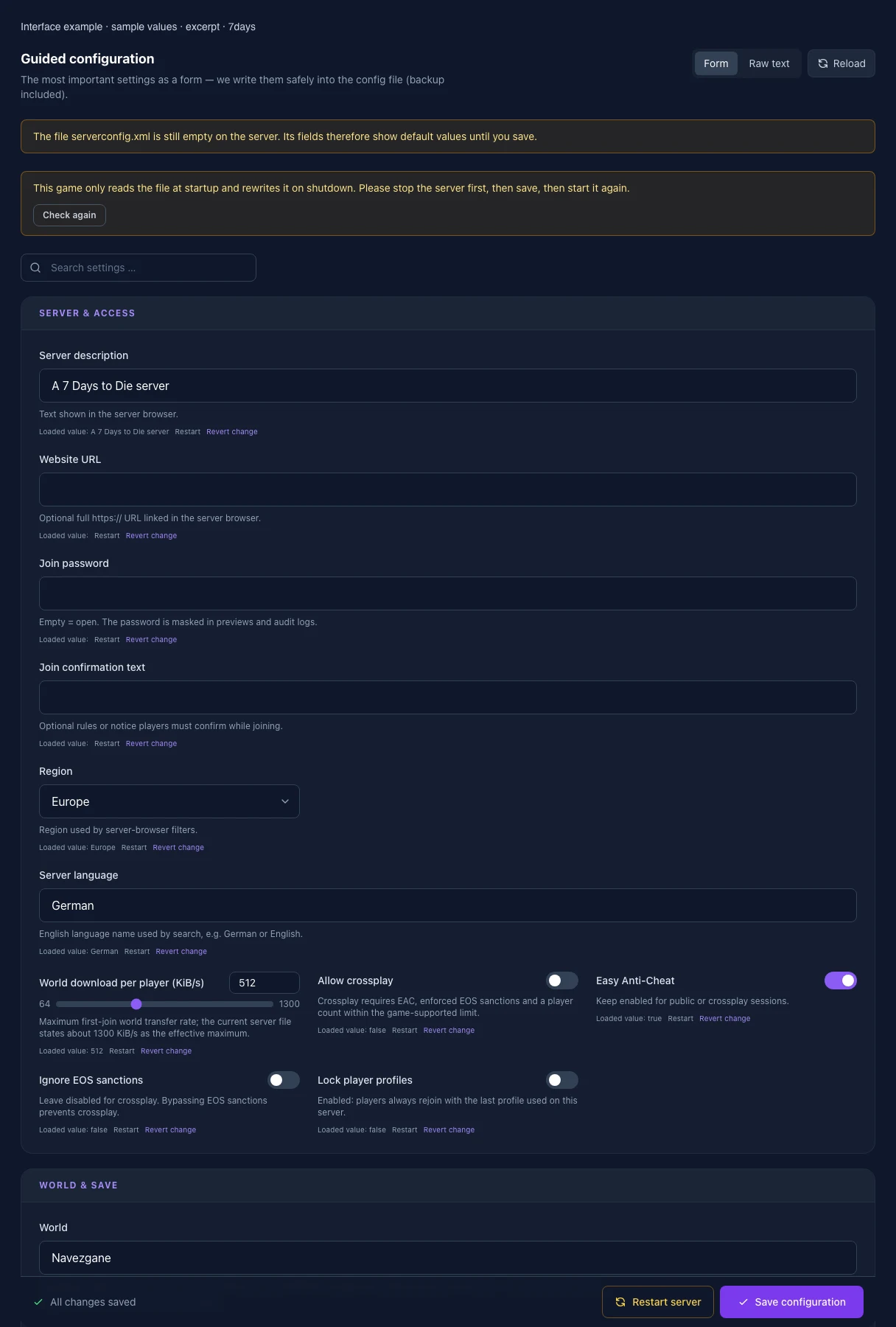
These values come from our guided editors. Defaults are the editor starting values; they do not show the contents of a customer server.
Text shown in the server browser.
Optional full https:// URL linked in the server browser.
Optional rules or notice players must confirm while joining.
Region used by server-browser filters.
English language name used by search, e.g. German or English.
Maximum first-join world transfer rate; the current server file states about 1300 KiB/s as the effective maximum.
Crossplay requires EAC, enforced EOS sanctions and a player count within the game-supported limit.
Keep enabled for public or crossplay sessions.
Leave disabled for crossplay. Bypassing EOS sanctions prevents crossplay.
Enabled: players always rejoin with the last profile used on this server.
Navezgane, RWG or the exact name of an existing world. WARNING: changing this loads/creates another save — back up the world first.
Only for GameWorld=RWG. Do not change after a series starts or another world may be selected.
Officially supported edge length. Larger worlds need considerably more generation time, RAM and disk.
Controls the save name. Do not change after a series starts; letters, digits, spaces and _-. are allowed.
Controls 150+ rules including difficulty, XP, day length, loot, zombie behaviour and Blood Moon. In the CURRENT 7DTD client open New Game → Sandbox Options, configure everything, choose Copy Code, then paste it here. Do not reuse legacy guide properties. Re-check/copy it after every game update: an invalid code can reset some or all settings to defaults.
New players create an enemy-free spawn zone through this level.
Duration of the enemy-free spawn zone in in-game hours.
Enable only for testing; this changes the conditions of a regular series.
Radius where zombies do not spawn and cleared sleeper volumes do not respawn.
Real days since the last login before a bedroll becomes inactive.
0 = disabled, 1 = always, 2 = only near friends in the forest biome.
0 = freely switchable, 1 = first person only, 2 = third person only.
Maximum distance for shared party kill XP and quest-kill credit.
0 = nobody, 1 = allies only, 2 = strangers only, 3 = everyone.
Maximum active land-claim blocks per player.
Edge length of the protected area in blocks.
Minimum block distance between claims owned by non-friends.
Offline time before protection expires.
0 = slow/linear, 1 = fast/exponential, 2 = no decay until expiry.
0 = indestructible; default 4 means four times block hardness.
0 = indestructible; default 4 means four times block hardness.
Minutes after logout before the offline hardness value applies.
World-wide limit with very high CPU impact; Blood Moon and sleepers apply additional internal scaling.
World-wide animal limit. Higher values mainly help when many players are spread far apart.
6–12; high values noticeably increase RAM and CPU usage.
Lower values save RAM but can slow chunk generation.
Dynamic distant rendering of world changes.
Restricts dynamic mesh to land-claim areas and reduces load.
Chunk radius around land claims included in dynamic mesh.
More concurrent items require more RAM.
-1 = disabled. Otherwise long-unvisited, unprotected chunks can reset to their original state.
-1 = disabled. At the limit the game may forcibly reset saved chunks — enable only deliberately.
Waehle die 7 Days to Die-Version (Steam-Branch). 'public' = neueste offizielle Version. Aeltere Branches (v2.6, v2.5, ...) fuer aeltere Overhaul-Mods wie War of the Walkers. Nach dem Aendern der Version im Bereich Einstellungen einen Reinstall ausloesen, damit die gewaehlte Version heruntergeladen wird (Weltdaten bleiben erhalten, Backup empfohlen). Die gewaehlte Version bleibt jetzt auch nach einem Server-Neustart erhalten.
Maximum player slots enforced at server startup (patched into serverconfig.xml ServerMaxPlayerCount by the GSH wrapper).
1 = beim Start updaten