Game updates, plugin versions and improvements to our interface with a traceable history.
Recorded, available and installed are different states. Your actual installation status and suitable updates are shown in the server panel.
InterfaceChange documented
Guided startup parameters: revised
The guided tools were revised in the shared panel code. The entry concerns the interface or its processing. The date records the change; availability on an individual server depends on the game, software, plugins and permissions.
InterfaceChange documented
Guided startup parameters: revised
The guided tools were revised in the shared panel code. The entry concerns the interface or its processing. The date records the change; availability on an individual server depends on the game, software, plugins and permissions.
InterfaceChange documented
Guided startup parameters: revised
The guided tools were revised in the shared panel code. The entry concerns the interface or its processing. The date records the change; availability on an individual server depends on the game, software, plugins and permissions.
InterfaceChange documented
Guided startup parameters: revised
The guided tools were revised in the shared panel code. The entry concerns the interface or its processing. The date records the change; availability on an individual server depends on the game, software, plugins and permissions.
InterfaceChange documented
Guided startup parameters: revised
The guided tools were revised in the shared panel code. The entry concerns the interface or its processing. The date records the change; availability on an individual server depends on the game, software, plugins and permissions.
InterfaceChange documented
Guided startup parameters: revised
The guided tools were revised in the shared panel code. The entry concerns the interface or its processing. The date records the change; availability on an individual server depends on the game, software, plugins and permissions.
Developer announcementPublished
BREACH AND CLEAR
Announcement from the official source. The source describes the changes; your server installation status is shown separately in the update center.
The guided tools were revised in the shared panel code. The entry concerns the interface or its processing. The date records the change; availability on an individual server depends on the game, software, plugins and permissions.
InterfaceChange documented
Rust: game tools: revised
The guided tools were revised in the shared panel code. The entry concerns the interface or its processing. The date records the change; availability on an individual server depends on the game, software, plugins and permissions.
InterfaceChange documented
Guided startup parameters: revised
The guided tools were revised in the shared panel code. The entry concerns the interface or its processing. The date records the change; availability on an individual server depends on the game, software, plugins and permissions.
InterfaceChange documented
Guided startup parameters: revised
The guided tools were revised in the shared panel code. The entry concerns the interface or its processing. The date records the change; availability on an individual server depends on the game, software, plugins and permissions.
InterfaceChange documented
Gameplay configuration: guided editor added
The guided interface was updated. The history shows added, changed and removed fields with explanations and editor defaults. The date records the documented change, not the historical deployment time.
Grief protection after TC destruction (minutes): Added
decay.upkeep_grief_protection
Maximum stored upkeep a destroyed Tool Cupboard may still consume for protection.
After
Setting
decay.upkeep_grief_protection
Default
1440
Range / options
0 – …
Upkeep period (minutes): Added
decay.upkeep_period_minutes
Default 1440 (24 hours). A higher value reduces ongoing upkeep cost.
After
Setting
decay.upkeep_period_minutes
Default
1440
Range / options
0 – …
Locked crate hack time (seconds): Added
hackablelockedcrate.requiredhackseconds
Default 900 seconds (15 minutes), for example for Oil Rig crates.
After
Setting
hackablelockedcrate.requiredhackseconds
Default
900
Range / options
0 – …
PvE mode: Added
server.pve
Disables player-versus-player damage and automatically applies the PvE tag.
After
Setting
server.pve
Default
false
Server tags: Added
server.tags
Comma-separated official tags, e.g. weekly,vanilla,roleplay. Do not combine conflicting tags from the same group.
After
Setting
server.tags
Default
Tutorial Island: Added
server.tutorialEnabled
Allows new players to use the official Tutorial Island. Also add the “tut” tag for discoverability.
After
Setting
server.tutorialEnabled
Default
false
SettingChange documented
Rust: startup parameters changed
The definition of visible startup parameters changed in the panel code. The listed values explain added, changed and removed fields. The date records the definition change; existing server values were not automatically changed by it.
Supported server software: Rust
Changed settings (3)
Auto Update: Changed
AUTO_UPDATE
1 = beim Start updaten
Before
Setting
AUTO_UPDATE
Default
1
When it takes effect
Takes effect after saving and restarting the server.
After
Setting
AUTO_UPDATE
Default
1
When it takes effect
Takes effect after saving and restarting the server.
Description: Changed
DESCRIPTION
The description under your server title. Commonly used for rules & info. Use \n for newlines.
Before
Setting
DESCRIPTION
Default
Powered by Pterodactyl
When it takes effect
Takes effect after saving and restarting the server.
After
Setting
DESCRIPTION
Default
Powered by game-serverhosting.com
When it takes effect
Takes effect after saving and restarting the server.
URL: Changed
SERVER_URL
The URL for your server. This is what comes up when clicking the "Visit Website" button.
Before
Setting
SERVER_URL
Default
http://pterodactyl.io
When it takes effect
Takes effect after saving and restarting the server.
After
Setting
SERVER_URL
Default
When it takes effect
Takes effect after saving and restarting the server.
InterfaceChange documented
Guided startup parameters: revised
The guided tools were revised in the shared panel code. The entry concerns the interface or its processing. The date records the change; availability on an individual server depends on the game, software, plugins and permissions.
InterfaceChange documented
Guided startup parameters: revised
The guided tools were revised in the shared panel code. The entry concerns the interface or its processing. The date records the change; availability on an individual server depends on the game, software, plugins and permissions.
InterfaceChange documented
Rust: game tools: revised
The guided tools were revised in the shared panel code. The entry concerns the interface or its processing. The date records the change; availability on an individual server depends on the game, software, plugins and permissions.
InterfaceChange documented
Guided startup parameters: revised
The guided tools were revised in the shared panel code. The entry concerns the interface or its processing. The date records the change; availability on an individual server depends on the game, software, plugins and permissions.
InterfaceChange documented
Guided startup parameters: revised
The guided tools were revised in the shared panel code. The entry concerns the interface or its processing. The date records the change; availability on an individual server depends on the game, software, plugins and permissions.
InterfaceChange documented
Guided startup parameters: revised
The guided tools were revised in the shared panel code. The entry concerns the interface or its processing. The date records the change; availability on an individual server depends on the game, software, plugins and permissions.
InterfaceChange documented
Guided startup parameters: revised
The guided tools were revised in the shared panel code. The entry concerns the interface or its processing. The date records the change; availability on an individual server depends on the game, software, plugins and permissions.
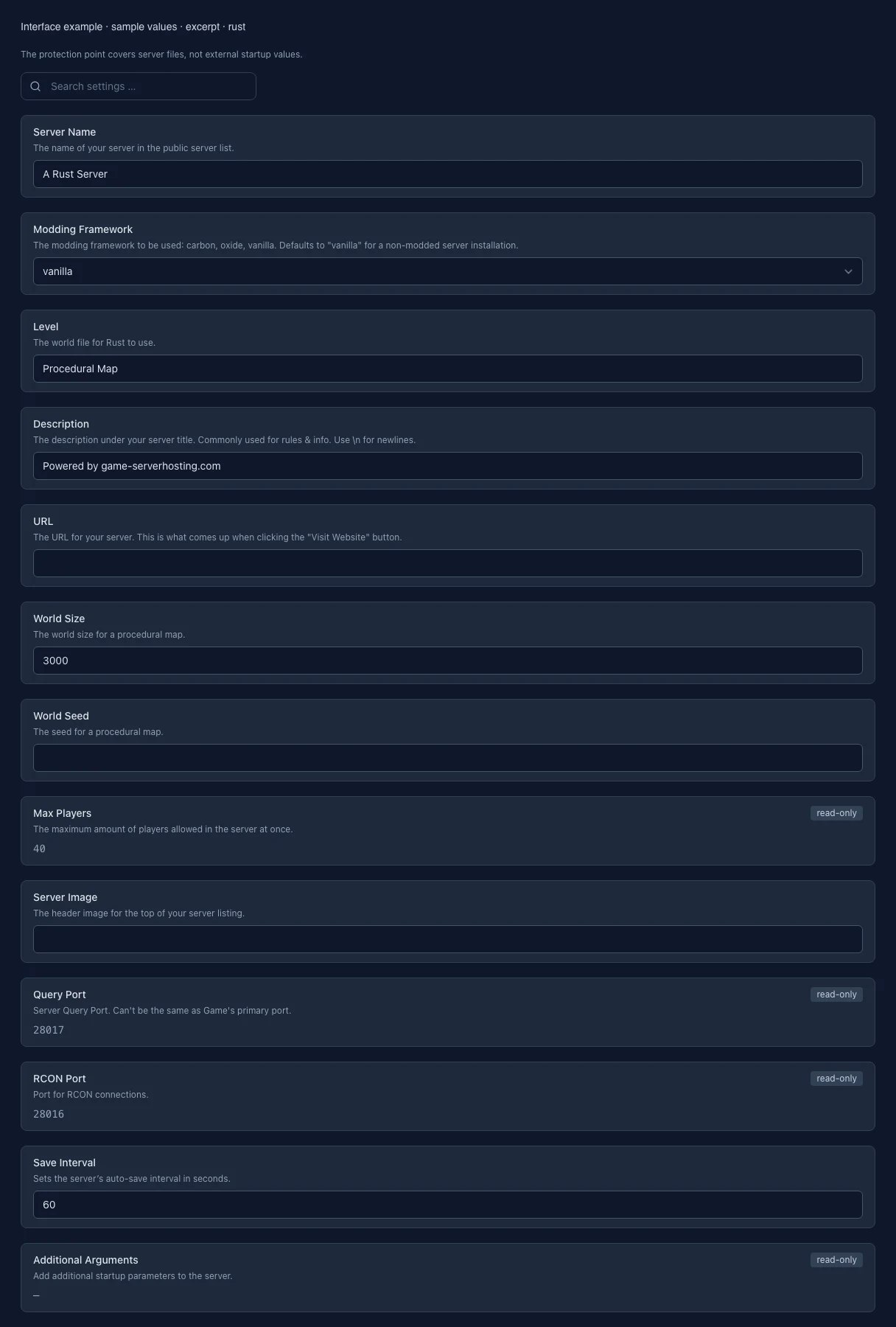
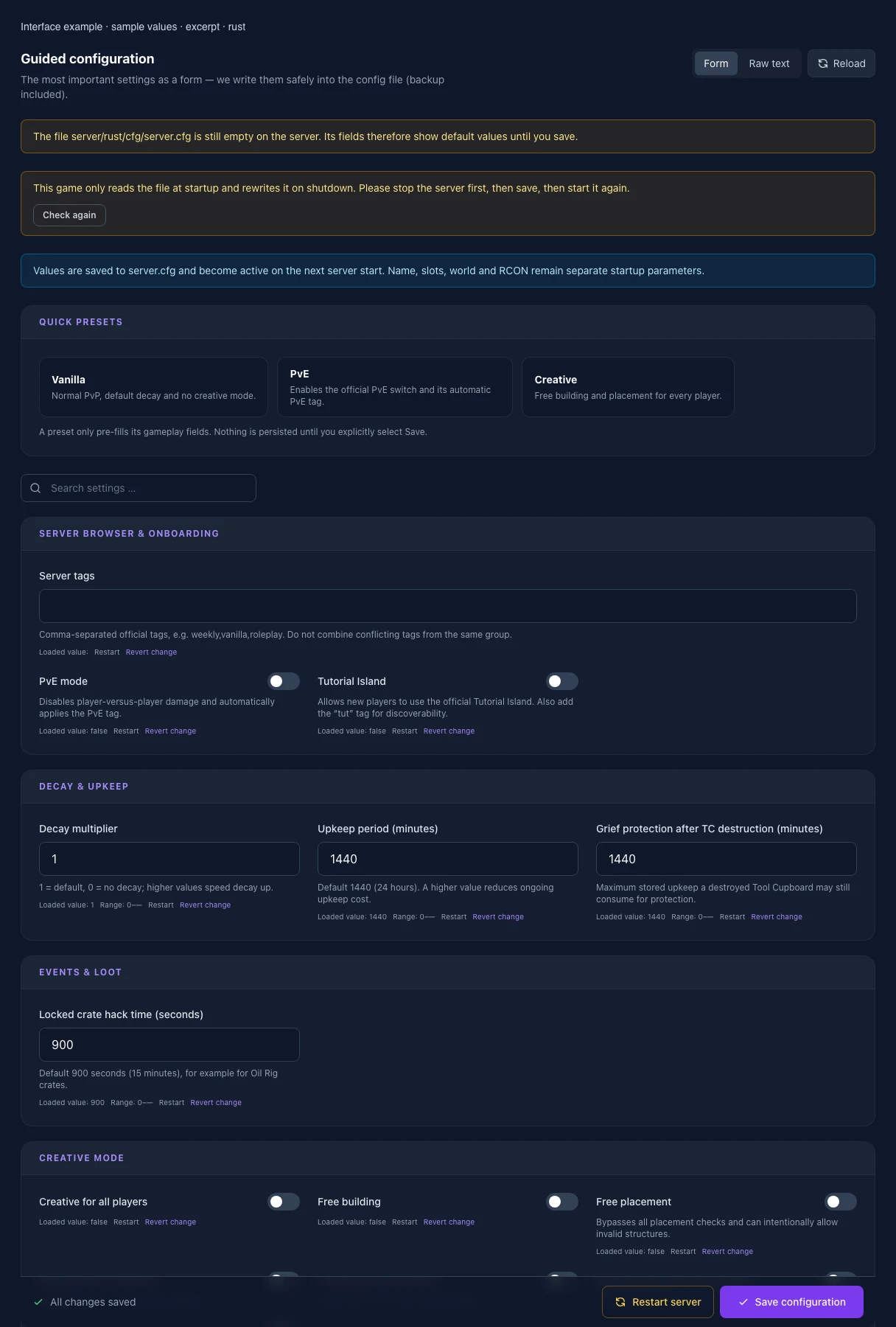
What the interface looks like
The image shows the interface on its capture date; earlier versions may differ.
Excerpt of the current interface with sample values. Values and prerequisites illustrate the controls; available tools depend on server software, plugins and permissions. · Captured on 2026-10-08Excerpt of the current interface with sample values. Values and prerequisites illustrate the controls; available tools depend on server software, plugins and permissions. · Captured on 2026-10-08
What the settings do
These values come from our guided editors. Defaults are the editor starting values; they do not show the contents of a customer server.
Server tags
Setting
server.tags
Default
When it takes effect
Takes effect after saving and restarting the server.
PvE mode
Setting
server.pve
Default
0
When it takes effect
Takes effect after saving and restarting the server.
Tutorial Island
Setting
server.tutorialEnabled
Default
0
When it takes effect
Takes effect after saving and restarting the server.
Decay multiplier
Setting
decay.scale
Default
1
Range / options
0 – …
When it takes effect
Takes effect after saving and restarting the server.
Upkeep period (minutes)
Setting
decay.upkeep_period_minutes
Default
1440
Range / options
0 – …
When it takes effect
Takes effect after saving and restarting the server.
Grief protection after TC destruction (minutes)
Setting
decay.upkeep_grief_protection
Default
1440
Range / options
0 – …
When it takes effect
Takes effect after saving and restarting the server.
Locked crate hack time (seconds)
Setting
hackablelockedcrate.requiredhackseconds
Default
900
Range / options
0 – …
When it takes effect
Takes effect after saving and restarting the server.
Creative for all players
Setting
creative.allusers
Default
0
When it takes effect
Takes effect after saving and restarting the server.
Free building
Setting
creative.freebuild
Default
0
When it takes effect
Takes effect after saving and restarting the server.
Free placement
Setting
creative.freeplacement
Default
0
When it takes effect
Takes effect after saving and restarting the server.
Bypass repair cooldown
Setting
creative.freerepair
Default
0
When it takes effect
Takes effect after saving and restarting the server.
Unlimited IO connections
Setting
creative.unlimitedio
Default
0
When it takes effect
Takes effect after saving and restarting the server.
Bypass placement hold duration
Setting
creative.bypassholdtoplaceduration
Default
0
When it takes effect
Takes effect after saving and restarting the server.
Allow Always-On commands
Setting
creative.alwaysonenabled
Default
0
When it takes effect
Takes effect after saving and restarting the server.
Server Name
The name of your server in the public server list.
Setting
HOSTNAME
Default
A Rust Server
When it takes effect
Takes effect after saving and restarting the server.
Modding Framework
The modding framework to be used: carbon, oxide, vanilla.
Defaults to "vanilla" for a non-modded server installation.
Setting
FRAMEWORK
Default
vanilla
Range / options
vanilla, oxide, carbon
When it takes effect
Takes effect after saving and restarting the server.
Level
The world file for Rust to use.
Setting
LEVEL
Default
Procedural Map
When it takes effect
Takes effect after saving and restarting the server.
Description
The description under your server title. Commonly used for rules & info. Use \n for newlines.
Setting
DESCRIPTION
Default
Powered by game-serverhosting.com
When it takes effect
Takes effect after saving and restarting the server.
URL
The URL for your server. This is what comes up when clicking the "Visit Website" button.
Setting
SERVER_URL
Default
When it takes effect
Takes effect after saving and restarting the server.
World Size
The world size for a procedural map.
Setting
WORLD_SIZE
Default
3000
When it takes effect
Takes effect after saving and restarting the server.
World Seed
The seed for a procedural map.
Setting
WORLD_SEED
Default
When it takes effect
Takes effect after saving and restarting the server.
Max Players
The maximum amount of players allowed in the server at once.
Setting
MAX_PLAYERS
Default
40
When it takes effect
Takes effect after saving and restarting the server.
Server Image
The header image for the top of your server listing.
Setting
SERVER_IMG
Default
When it takes effect
Takes effect after saving and restarting the server.
Query Port
Server Query Port. Can't be the same as Game's primary port.
Setting
QUERY_PORT
Default
28017
When it takes effect
Takes effect after saving and restarting the server.
Save Interval
Sets the server’s auto-save interval in seconds.
Setting
SAVEINTERVAL
Default
60
When it takes effect
Takes effect after saving and restarting the server.
Additional Arguments
Add additional startup parameters to the server.
Setting
ADDITIONAL_ARGS
Default
When it takes effect
Takes effect after saving and restarting the server.
App Port
Port for the Rust+ App. -1 to disable.
Setting
APP_PORT
Default
28082
When it takes effect
Takes effect after saving and restarting the server.
Server Logo
The circular server logo for the Rust+ app.
Setting
SERVER_LOGO
Default
When it takes effect
Takes effect after saving and restarting the server.
Custom Map URL
Overwrites the map with the one from the direct download URL. Invalid URLs will cause the server to crash.
Setting
MAP_URL
Default
When it takes effect
Takes effect after saving and restarting the server.
Auto Update
1 = beim Start updaten
Setting
AUTO_UPDATE
Default
1
When it takes effect
Takes effect after saving and restarting the server.
Loading...
Cookie settings
We use cookies to improve your experience and analyze our website.
Cookie settings
Essential cookies
Required
These cookies are required for the core functions of the website and cannot be disabled.
Analytics cookies
Help us understand how the website and customer area are used (our own usage analytics, Google Analytics, Microsoft Clarity).
Marketing cookies
Allow the pseudonymous matching of an ad click to an order in order to measure conversions.