Game updates, plugin versions and improvements to our interface with a traceable history.
Recorded, available and installed are different states. Your actual installation status and suitable updates are shown in the server panel.
Game updatePublished
Counter-Strike 2 Update
Announcement from the official source. The source describes the changes; your server installation status is shown separately in the update center.
Effects on plugins
No independent plugin compatibility test is documented for this announcement. Check the affected plugins in the update center before changing game versions.
Announcement from the official source. The source describes the changes; your server installation status is shown separately in the update center.
Effects on plugins
No independent plugin compatibility test is documented for this announcement. Check the affected plugins in the update center before changing game versions.
Announcement from the official source. The source describes the changes; your server installation status is shown separately in the update center.
Effects on plugins
No independent plugin compatibility test is documented for this announcement. Check the affected plugins in the update center before changing game versions.
Announcement from the official source. The source describes the changes; your server installation status is shown separately in the update center.
Effects on plugins
No independent plugin compatibility test is documented for this announcement. Check the affected plugins in the update center before changing game versions.
Announcement from the official source. The source describes the changes; your server installation status is shown separately in the update center.
Effects on plugins
No independent plugin compatibility test is documented for this announcement. Check the affected plugins in the update center before changing game versions.
Announcement from the official source. The source describes the changes; your server installation status is shown separately in the update center.
Effects on plugins
No independent plugin compatibility test is documented for this announcement. Check the affected plugins in the update center before changing game versions.
Announcement from the official source. The source describes the changes; your server installation status is shown separately in the update center.
Effects on plugins
No independent plugin compatibility test is documented for this announcement. Check the affected plugins in the update center before changing game versions.
Announcement from the official source. The source describes the changes; your server installation status is shown separately in the update center.
Effects on plugins
No independent plugin compatibility test is documented for this announcement. Check the affected plugins in the update center before changing game versions.
Announcement from the official source. The source describes the changes; your server installation status is shown separately in the update center.
Effects on plugins
No independent plugin compatibility test is documented for this announcement. Check the affected plugins in the update center before changing game versions.
Announcement from the official source. The source describes the changes; your server installation status is shown separately in the update center.
Effects on plugins
No independent plugin compatibility test is documented for this announcement. Check the affected plugins in the update center before changing game versions.
Announcement from the official source. The source describes the changes; your server installation status is shown separately in the update center.
Effects on plugins
No independent plugin compatibility test is documented for this announcement. Check the affected plugins in the update center before changing game versions.
Announcement from the official source. The source describes the changes; your server installation status is shown separately in the update center.
Effects on plugins
No independent plugin compatibility test is documented for this announcement. Check the affected plugins in the update center before changing game versions.
The guided tools were revised in the shared panel code. The entry concerns the interface or its processing. The date records the change; availability on an individual server depends on the game, software, plugins and permissions.
Changed interface controls
Added
newToken
newWorkshopId
newWorkshopName
SettingChange documented
Counter-Strike 2: editor settings changed
The editor describes new or changed values. The field comparison shows the original defaults, constraints and explanations before and after this documented change.
Changed settings (1)
GSLT Token: Removed
sv_setsteamaccount
Before
Setting
sv_setsteamaccount
Default
When it takes effect
Takes effect after saving and restarting the server.
SettingChange documented
Counter-Strike 2: editor settings changed
The editor describes new or changed values. The field comparison shows the original defaults, constraints and explanations before and after this documented change.
Changed settings (11)
Bot-Anzahl: Added
bot_quota
After
Setting
bot_quota
Default
0
Range / options
0 – 32
When it takes effect
Follow the editor’s activation instructions when saving.
Spielmodus: Added
game_mode
After
Setting
game_mode
Default
0
Range / options
0, 1, 2
When it takes effect
Takes effect after saving and restarting the server.
Spielmodus-Typ: Added
game_type
After
Setting
game_type
Default
0
Range / options
0, 1, 2, 3, 4
When it takes effect
Takes effect after saving and restarting the server.
Kaufzeit (Sek.): Added
mp_buytime
After
Setting
mp_buytime
Default
20
Range / options
0 – 120
When it takes effect
Follow the editor’s activation instructions when saving.
Freeze-Zeit (Sek.): Added
mp_freezetime
After
Setting
mp_freezetime
Default
15
Range / options
0 – 60
When it takes effect
Follow the editor’s activation instructions when saving.
Max Runden: Added
mp_maxrounds
After
Setting
mp_maxrounds
Default
30
Range / options
0 – 200
When it takes effect
Follow the editor’s activation instructions when saving.
Rundenzeit (Minuten): Added
mp_roundtime
After
Setting
mp_roundtime
Default
1.92
Range / options
0.5 – 60
When it takes effect
Follow the editor’s activation instructions when saving.
Warmup-Zeit (Sek.): Added
mp_warmuptime
After
Setting
mp_warmuptime
Default
30
Range / options
0 – 600
When it takes effect
Follow the editor’s activation instructions when saving.
Cheats erlauben: Added
sv_cheats
After
Setting
sv_cheats
Default
0
When it takes effect
Follow the editor’s activation instructions when saving.
Max Rate: Added
sv_maxrate
After
Setting
sv_maxrate
Default
0
Range / options
0 – 786432
When it takes effect
Follow the editor’s activation instructions when saving.
GSLT Token: Added
sv_setsteamaccount
After
Setting
sv_setsteamaccount
Default
When it takes effect
Takes effect after saving and restarting the server.
InterfaceChange documented
Counter-Strike 2: game tools: added
The guided tools were added to the shared panel code. The entry concerns the interface or its processing. The date records the change; availability on an individual server depends on the game, software, plugins and permissions.
SettingChange documented
Counter-Strike 2: editor settings changed
The editor describes new or changed values. The field comparison shows the original defaults, constraints and explanations before and after this documented change.
Changed settings (1)
Server Name: Added
hostname
After
Setting
hostname
Default
CS2 Server
When it takes effect
Follow the editor’s activation instructions when saving.
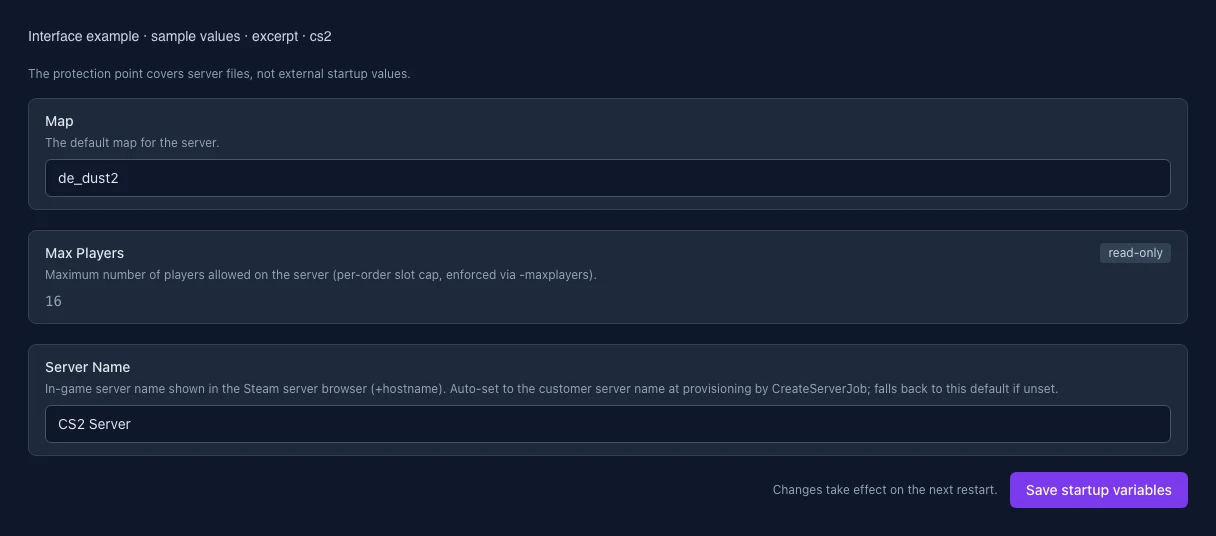
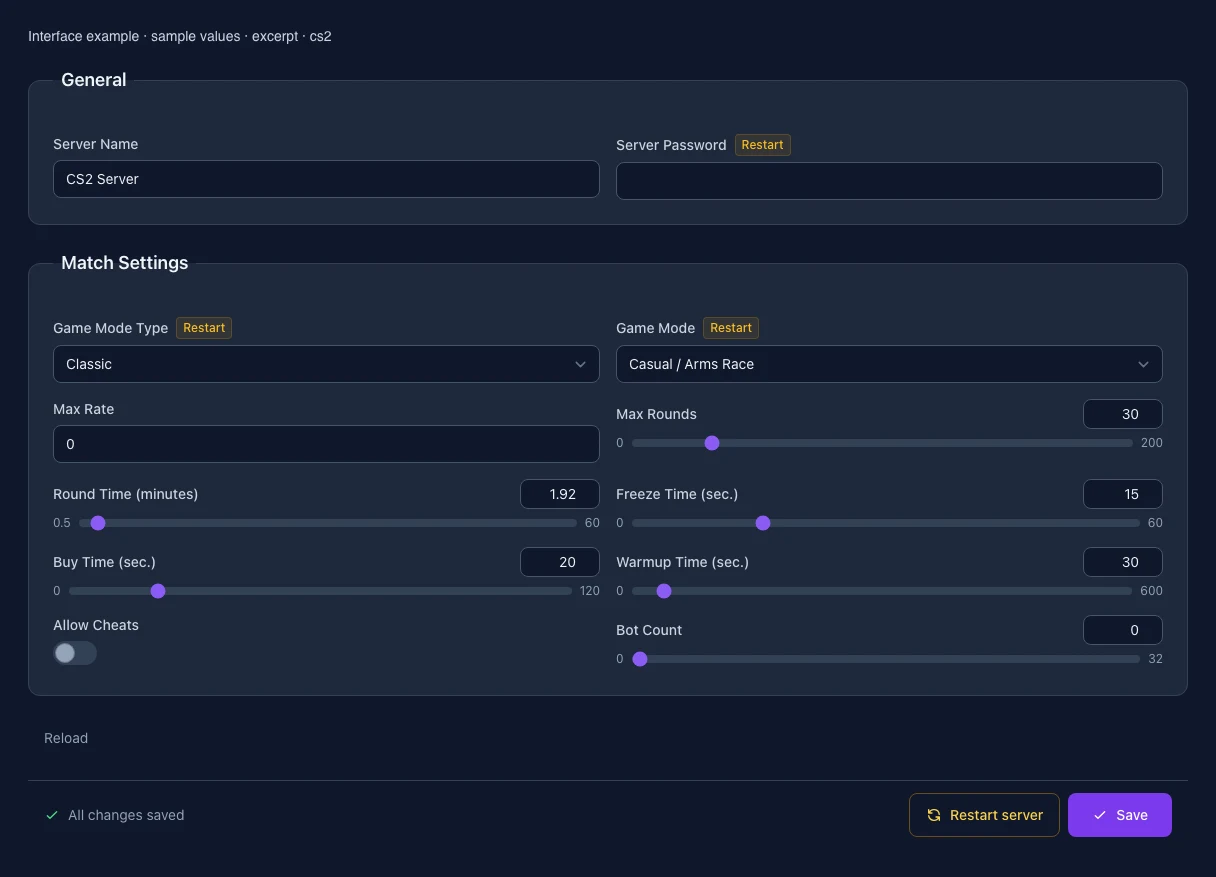
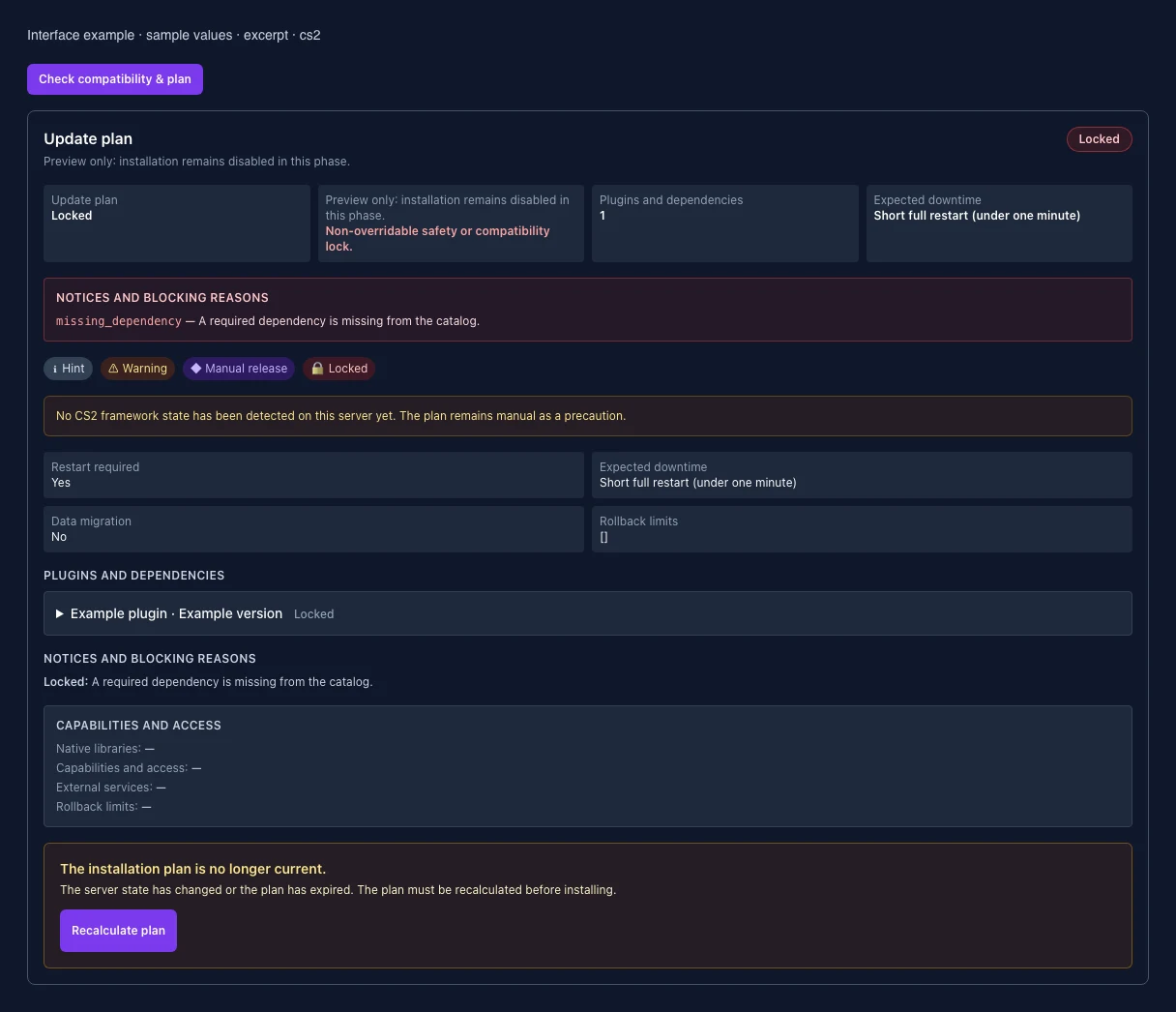
What the interface looks like
The image shows the interface on its capture date; earlier versions may differ.
Excerpt of the current interface with sample values. Values and prerequisites illustrate the controls; available tools depend on server software, plugins and permissions. · Captured on 2026-10-08Excerpt of the current interface with sample values. Values and prerequisites illustrate the controls; available tools depend on server software, plugins and permissions. · Captured on 2026-10-08Excerpt of the current interface with sample values. Values and prerequisites illustrate the controls; available tools depend on server software, plugins and permissions. · Captured on 2026-10-08
What the settings do
These values come from our guided editors. Defaults are the editor starting values; they do not show the contents of a customer server.
Server Name
Setting
hostname
Default
CS2 Server
When it takes effect
Follow the editor’s activation instructions when saving.
Game Mode Type
Setting
game_type
Default
0
Range / options
0, 1, 3
When it takes effect
Takes effect after saving and restarting the server.
Game Mode
Setting
game_mode
Default
0
Range / options
0, 1, 2
When it takes effect
Takes effect after saving and restarting the server.
Max Rate
Setting
sv_maxrate
Default
0
Range / options
0 – 786432
When it takes effect
Follow the editor’s activation instructions when saving.
Max Rounds
Setting
mp_maxrounds
Default
30
Range / options
0 – 200
When it takes effect
Follow the editor’s activation instructions when saving.
Round Time (minutes)
Setting
mp_roundtime
Default
1.92
Range / options
0.5 – 60
When it takes effect
Follow the editor’s activation instructions when saving.
Freeze Time (sec.)
Setting
mp_freezetime
Default
15
Range / options
0 – 60
When it takes effect
Follow the editor’s activation instructions when saving.
Buy Time (sec.)
Setting
mp_buytime
Default
20
Range / options
0 – 120
When it takes effect
Follow the editor’s activation instructions when saving.
Warmup Time (sec.)
Setting
mp_warmuptime
Default
30
Range / options
0 – 600
When it takes effect
Follow the editor’s activation instructions when saving.
Allow Cheats
Setting
sv_cheats
Default
0
When it takes effect
Follow the editor’s activation instructions when saving.
Bot Count
Setting
bot_quota
Default
0
Range / options
0 – 32
When it takes effect
Follow the editor’s activation instructions when saving.
Map
The default map for the server.
Setting
SRCDS_MAP
Default
de_dust2
When it takes effect
Takes effect after saving and restarting the server.
Max Players
Maximum number of players allowed on the server (per-order slot cap, enforced via -maxplayers).
Setting
MAX_PLAYERS
Default
16
Range / options
1 – 64
When it takes effect
Takes effect after saving and restarting the server.
Server Name
In-game server name shown in the Steam server browser (+hostname). Auto-set to the customer server name at provisioning by CreateServerJob; falls back to this default if unset.
Setting
HOSTNAME
Default
CS2 Server
When it takes effect
Takes effect after saving and restarting the server.
Loading...
Cookie settings
We use cookies to improve your experience and analyze our website.
Cookie settings
Essential cookies
Required
These cookies are required for the core functions of the website and cannot be disabled.
Analytics cookies
Help us understand how the website and customer area are used (our own usage analytics, Google Analytics, Microsoft Clarity).
Marketing cookies
Allow the pseudonymous matching of an ad click to an order in order to measure conversions.