Back to overview

ARK: Survival Evolved: updates, settings and interface

Game updates, plugin versions and improvements to our interface with a traceable history.

Recorded, available and installed are different states. Your actual installation status and suitable updates are shown in the server panel.

Developer announcement Published

New Extinction Teasers!

Announcement from the official source. The source describes the changes; your server installation status is shown separately in the update center.

Developer announcement Published

Extinction Chronicles III Begins Tomorrow!

Announcement from the official source. The source describes the changes; your server installation status is shown separately in the update center.

Developer announcement Published

Mysterious Mysteries: Introducing ???????

Announcement from the official source. The source describes the changes; your server installation status is shown separately in the update center.

Developer announcement Published

Extinction Chronicles II, & ARKaeology Ending Tomorrow!

Announcement from the official source. The source describes the changes; your server installation status is shown separately in the update center.

Developer announcement Published

Mysterious Mysteries: Introducing ???????, Fourth of July 2x Breeding, New Bug Reporting System, & Small Tribes Clusters Coming!

Announcement from the official source. The source describes the changes; your server installation status is shown separately in the update center.

Game update Published

ARK: Extinction Release Date Revealed!

Announcement from the official source. The source describes the changes; your server installation status is shown separately in the update center.

Effects on plugins

No independent plugin compatibility test is documented for this announcement. Check the affected plugins in the update center before changing game versions.

Developer announcement Published

Announcing: ARKaeology Event!

Announcement from the official source. The source describes the changes; your server installation status is shown separately in the update center.

Developer announcement Published

Small Tribes Servers, Upcoming Structure Changes, & More!

Announcement from the official source. The source describes the changes; your server installation status is shown separately in the update center.

Developer announcement Published

Happy Birthday ARK: Year Three!

Announcement from the official source. The source describes the changes; your server installation status is shown separately in the update center.

Developer announcement Published

Code of Conduct Changes, Great Migration, Cooking with Zen & More!

Announcement from the official source. The source describes the changes; your server installation status is shown separately in the update center.

Game update Published

PC Update v279.282: Primitive Plus Update & Bug Fixes!

Announcement from the official source. The source describes the changes; your server installation status is shown separately in the update center.

Effects on plugins

No independent plugin compatibility test is documented for this announcement. Check the affected plugins in the update center before changing game versions.

Developer announcement Published

Community Live Stream, Forced Mindwipe, & More!

Announcement from the official source. The source describes the changes; your server installation status is shown separately in the update center.

Game update Published

Recent Update, Overseer’s Code of Conduct, and Incident Reports

Announcement from the official source. The source describes the changes; your server installation status is shown separately in the update center.

Effects on plugins

No independent plugin compatibility test is documented for this announcement. Check the affected plugins in the update center before changing game versions.

Game update Published

Rideable Moschops, Sponsored Mod Program Update & More!

Announcement from the official source. The source describes the changes; your server installation status is shown separately in the update center.

Effects on plugins

No independent plugin compatibility test is documented for this announcement. Check the affected plugins in the update center before changing game versions.

Game update Published

Rideable Moschops, Sponsored Mod Program Update & More!

Announcement from the official source. The source describes the changes; your server installation status is shown separately in the update center.

Effects on plugins

No independent plugin compatibility test is documented for this announcement. Check the affected plugins in the update center before changing game versions.

Developer announcement Published

Eggcellent Adventure Returns & Community Crunch 124!

Announcement from the official source. The source describes the changes; your server installation status is shown separately in the update center.

Developer announcement Published

Eggcellent Adventure Returns & Community Crunch 124!

Announcement from the official source. The source describes the changes; your server installation status is shown separately in the update center.

Developer announcement Published

TLC Pass 2: Argentavis, Parasaur, Raptor, Sarco, Spinosaur, & Triceratops!

Announcement from the official source. The source describes the changes; your server installation status is shown separately in the update center.

Developer announcement Published

TLC Pass 2: Argentavis, Parasaur, Raptor, Sarco, Spinosaur, & Triceratops!

Announcement from the official source. The source describes the changes; your server installation status is shown separately in the update center.

Game update Published

Updated TLC Dossiers & Mod Workshop #1!

Announcement from the official source. The source describes the changes; your server installation status is shown separately in the update center.

Effects on plugins

No independent plugin compatibility test is documented for this announcement. Check the affected plugins in the update center before changing game versions.

What the interface looks like

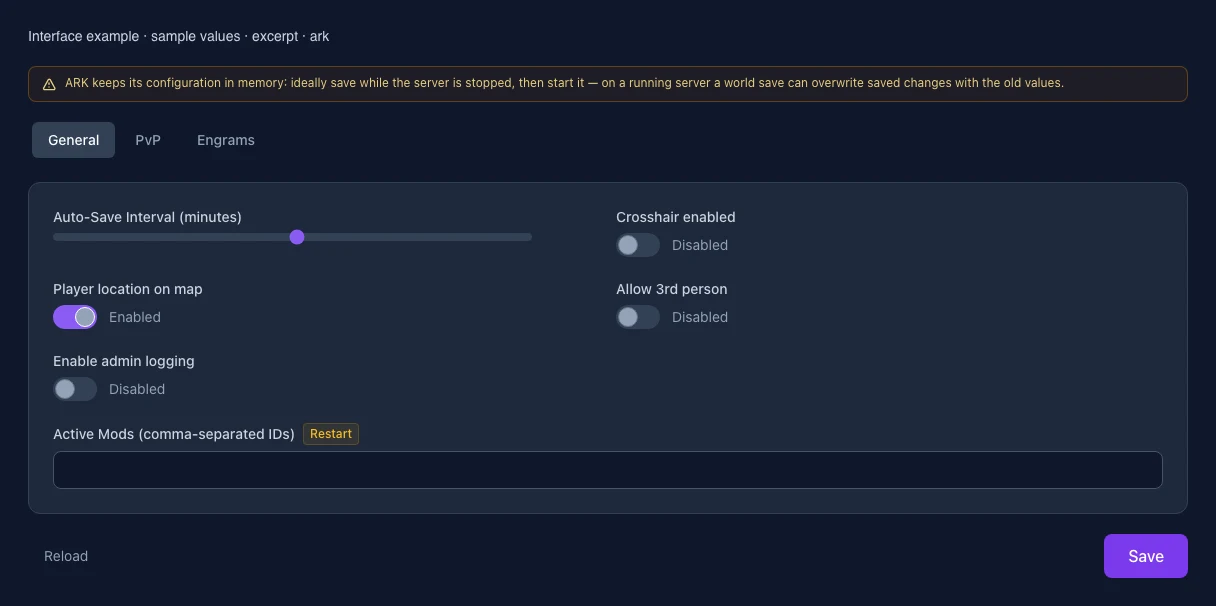
The image shows the interface on its capture date; earlier versions may differ.
Excerpt of the current interface with sample values. Values and prerequisites illustrate the controls; available tools depend on server software, plugins and permissions.
Excerpt of the current interface with sample values. Values and prerequisites illustrate the controls; available tools depend on server software, plugins and permissions. · Captured on 2026-10-08
Excerpt of the current interface with sample values. Values and prerequisites illustrate the controls; available tools depend on server software, plugins and permissions.
Excerpt of the current interface with sample values. Values and prerequisites illustrate the controls; available tools depend on server software, plugins and permissions. · Captured on 2026-10-08

What the settings do

These values come from our guided editors. Defaults are the editor starting values; they do not show the contents of a customer server.

Auto-Save Interval (minutes)
Setting
ServerSettings.AutoSavePeriodMinutes
Default
15
Range / options
5 – 60
When it takes effect
Follow the editor’s activation instructions when saving.
Crosshair enabled
Setting
ServerSettings.ServerCrosshair
Default
False
When it takes effect
Follow the editor’s activation instructions when saving.
Player location on map
Setting
ServerSettings.ShowMapPlayerLocation
Default
True
When it takes effect
Follow the editor’s activation instructions when saving.
Allow 3rd person
Setting
ServerSettings.AllowThirdPersonPlayer
Default
False
When it takes effect
Follow the editor’s activation instructions when saving.
Enable admin logging
Setting
ServerSettings.AdminLogging
Default
False
When it takes effect
Follow the editor’s activation instructions when saving.
Active Mods (comma-separated IDs)
Setting
ServerSettings.ActiveMods
Default
When it takes effect
Takes effect after saving and restarting the server.
XP Multiplier
Setting
ServerSettings.XPMultiplier
Default
1
Range / options
0.1 – 50
When it takes effect
Follow the editor’s activation instructions when saving.
Taming Speed
Setting
ServerSettings.TamingSpeedMultiplier
Default
1
Range / options
0.1 – 50
When it takes effect
Follow the editor’s activation instructions when saving.
Harvest Amount
Setting
ServerSettings.HarvestAmountMultiplier
Default
1
Range / options
0.1 – 50
When it takes effect
Follow the editor’s activation instructions when saving.
Resource Respawn
Setting
ServerSettings.ResourcesRespawnPeriodMultiplier
Default
1
Range / options
0.1 – 10
When it takes effect
Follow the editor’s activation instructions when saving.
Player Damage
Setting
ServerSettings.PlayerDamageMultiplier
Default
1
Range / options
0.1 – 10
When it takes effect
Follow the editor’s activation instructions when saving.
Dino Harvest Damage
Setting
ServerSettings.DinoHarvestingDamageMultiplier
Default
1
Range / options
0.1 – 10
When it takes effect
Follow the editor’s activation instructions when saving.
Food Drain
Setting
ServerSettings.PlayerCharacterFoodDrainMultiplier
Default
1
Range / options
0.1 – 5
When it takes effect
Follow the editor’s activation instructions when saving.
Water Drain
Setting
ServerSettings.PlayerCharacterWaterDrainMultiplier
Default
1
Range / options
0.1 – 5
When it takes effect
Follow the editor’s activation instructions when saving.
PvE Mode (no PvP)
Setting
ServerSettings.ServerPvE
Default
False
When it takes effect
Follow the editor’s activation instructions when saving.
Allow cave building in PvE
Setting
ServerSettings.AllowCaveBuildingPvE
Default
False
When it takes effect
Follow the editor’s activation instructions when saving.
Allow flyer carry in PvE
Setting
ServerSettings.AllowFlyerCarryPvE
Default
False
When it takes effect
Follow the editor’s activation instructions when saving.
Allow raid dino feeding
Setting
ServerSettings.AllowRaidDinoFeeding
Default
False
When it takes effect
Follow the editor’s activation instructions when saving.
Max structures in range
Setting
ServerSettings.TheMaxStructuresInRange
Default
10500
Range / options
1000 – 50000
When it takes effect
Follow the editor’s activation instructions when saving.
Max tamed dinos
Setting
ServerSettings.MaxTamedDinos
Default
5000
Range / options
100 – 20000
When it takes effect
Follow the editor’s activation instructions when saving.
Auto-destroy old structures
Setting
ServerSettings.AutoDestroyOldStructuresMultiplier
Default
0
Range / options
0 – 2
When it takes effect
Follow the editor’s activation instructions when saving.
Auto-unlock all engrams
Setting
ServerSettings.AutoUnlockAllEngrams
Default
False
When it takes effect
Takes effect after saving and restarting the server.
Mating Interval
Setting
shootergamemode::MatingIntervalMultiplier
Default
1
Range / options
0.01 – 5
When it takes effect
Follow the editor’s activation instructions when saving.
Baby Maturation Speed
Setting
shootergamemode::BabyMatureSpeedMultiplier
Default
1
Range / options
0.1 – 50
When it takes effect
Follow the editor’s activation instructions when saving.
Egg Hatch Speed
Setting
shootergamemode::EggHatchSpeedMultiplier
Default
1
Range / options
0.1 – 50
When it takes effect
Follow the editor’s activation instructions when saving.
Baby Food Consumption
Setting
shootergamemode::BabyFoodConsumptionSpeedMultiplier
Default
1
Range / options
0.1 – 10
When it takes effect
Follow the editor’s activation instructions when saving.
Lay Egg Interval
Setting
shootergamemode::LayEggIntervalMultiplier
Default
1
Range / options
0.1 – 5
When it takes effect
Follow the editor’s activation instructions when saving.
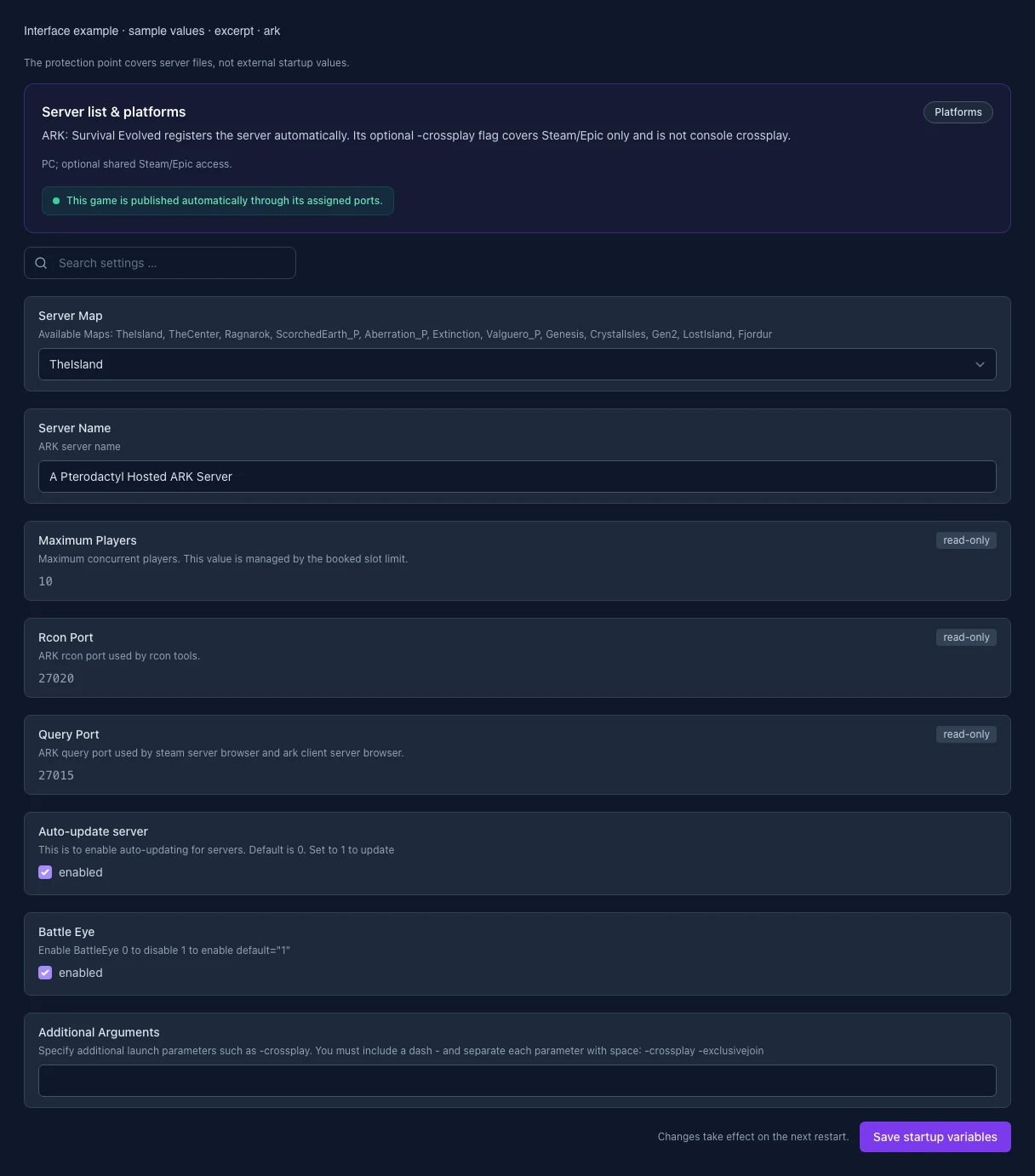
Server Map

Available Maps: TheIsland, TheCenter, Ragnarok, ScorchedEarth_P, Aberration_P, Extinction, Valguero_P, Genesis, CrystalIsles, Gen2, LostIsland, Fjordur

Setting
SERVER_MAP
Default
TheIsland
Range / options
TheIsland, TheCenter, ScorchedEarth_P, Ragnarok, Aberration_P, Extinction, Valguero_P, Genesis, CrystalIsles, Gen2, LostIsland, Fjordur
When it takes effect
Takes effect after saving and restarting the server.
Server Name

ARK server name

Setting
SESSION_NAME
Default
A Pterodactyl Hosted ARK Server
When it takes effect
Takes effect after saving and restarting the server.
Maximum Players

Maximum concurrent players. This value is managed by the booked slot limit.

Setting
MAX_PLAYERS
Default
10
Range / options
1 – 127
When it takes effect
Takes effect after saving and restarting the server.
Query Port

ARK query port used by steam server browser and ark client server browser.

Setting
QUERY_PORT
Default
27015
When it takes effect
Takes effect after saving and restarting the server.
Auto-update server

This is to enable auto-updating for servers. Default is 0. Set to 1 to update

Setting
AUTO_UPDATE
Default
1
When it takes effect
Takes effect after saving and restarting the server.
Battle Eye

Enable BattleEye 0 to disable 1 to enable default="1"

Setting
BATTLE_EYE
Default
1
When it takes effect
Takes effect after saving and restarting the server.
Additional Arguments

Specify additional launch parameters such as -crossplay. You must include a dash - and separate each parameter with space: -crossplay -exclusivejoin

Setting
ARGS
Default
When it takes effect
Takes effect after saving and restarting the server.