Create+ for your group

6 GB Memory (RAM)

The catalog lists Create+ with Minecraft 1.21.1, NeoForge and a RAM guideline of 6 GB. EZPlayHost packages are sold by player slots. Before choosing one, compare its included memory with this guideline, even if only a few friends will be joining.

  • Credit, not a subscription

Server locations: Germany · France · USA (Virginia, US East).

This page measures the ping from your browser to each location.

Understand this pack edition

Create+ is the name of this catalog entry. Its combination with Minecraft 1.21.1 and NeoForge identifies the configuration described here. A pack with a similar name may be a different edition. Check the full name and Minecraft version before your group settles on a release.

The 6 GB figure is the resource guideline stored for this page. It is neither a measured ceiling nor a fixed number of supported players. Changes to the pack and the way you use your world can affect actual memory demand. Assess player slots and RAM separately.

EZPlayHost offers paid server packages. The number of slots you book limits how many people can play at once. It does not establish whether every modpack fits: check the memory shown for your chosen package as well. Read the current amount during ordering rather than relying on a price quoted in an older article.

Compare the details of your Minecraft installations too. Matching game versions alone do not identify a configuration when pack editions differ. Write down the pack name and release together. This makes it easier to establish whether a connection problem appeared after someone changed versions. Keep your own copy of the world and its settings before making changes. Then change one component at a time and record what you tried. If the result is unexpected, you can identify the last change instead of investigating several possible causes at once. Do not replace a loader simply because another one has a higher version number.

This page describes the existing catalog configuration. It promises no particular frame rate, no world free of delays and no successful startup for every modified setup. Check the separate test statuses. When a matching current result is absent, treat the configuration as unconfirmed.

Start your server now

Game, loader and pack are preselected and remain adjustable.

Video (0:14): Create+

Our own captures from a demonstration environment. The version and setup shown may differ from your server.

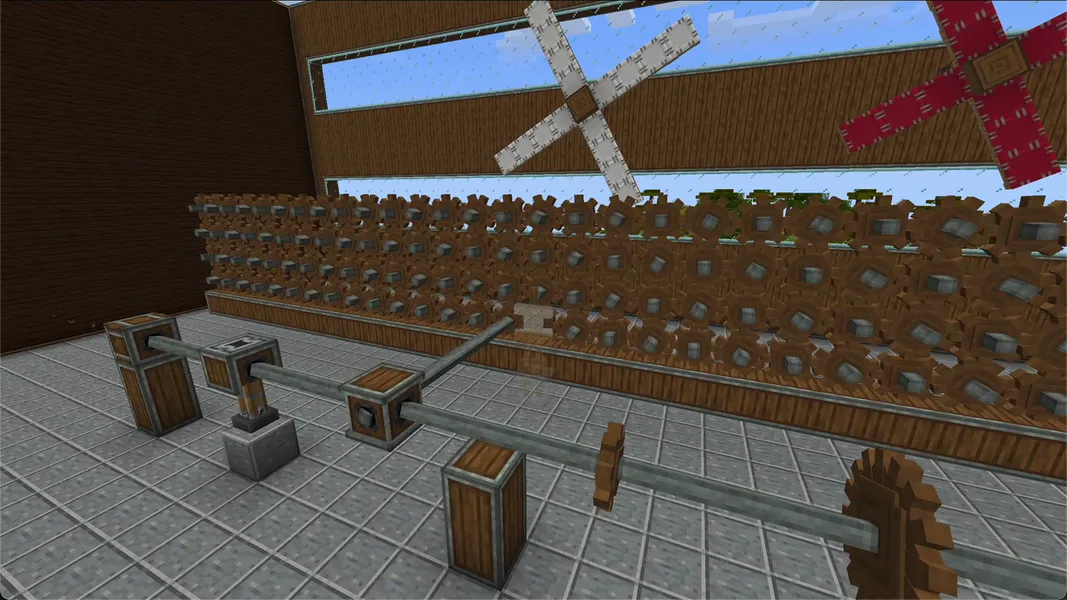
  1. Camera move through the machine hall: shaft, flywheel and cogwheels, driven by a creative motor.
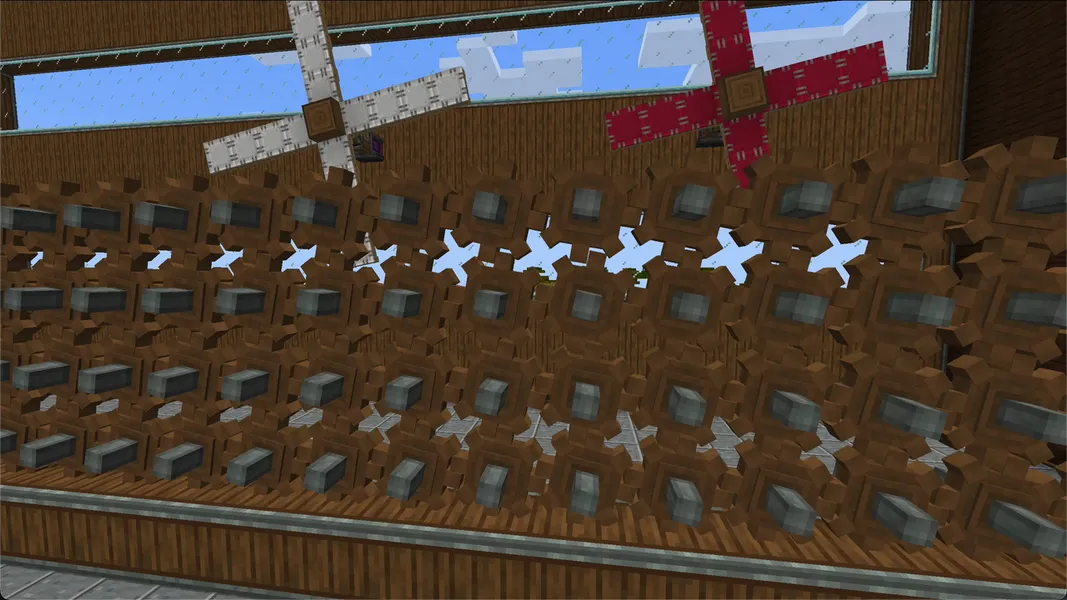
  2. Gear wall up close: every cogwheel meshes with its neighbours.
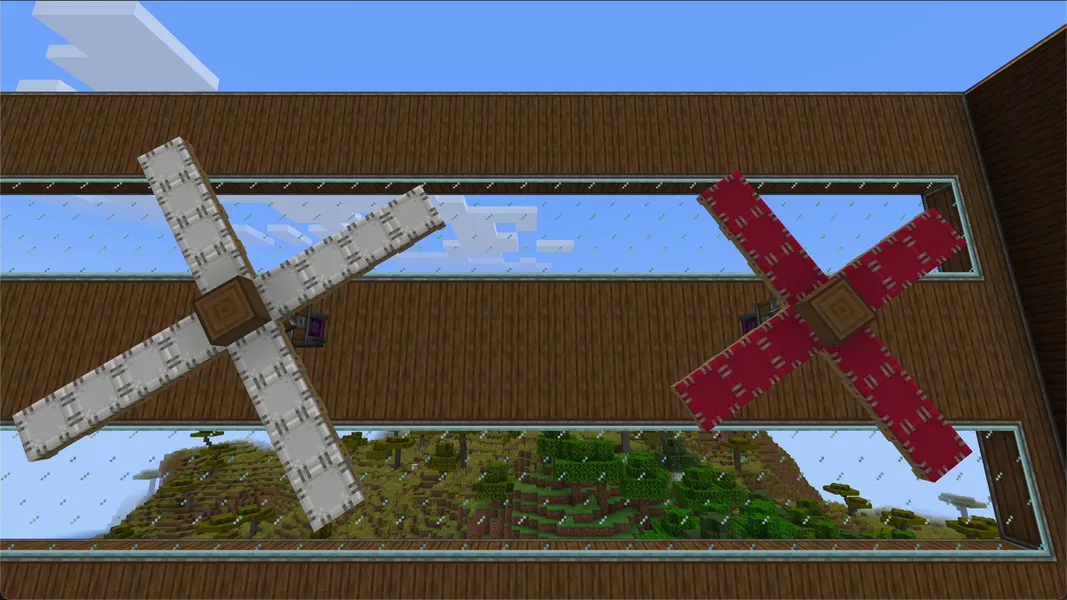
  3. Two windmills turn as a moving contraption on mechanical bearings.
  4. Pan along the drive shaft with press, gearbox and fan.
Create+: Machine hall, built by command in creative mode: drive shaft in front, gear wall and two windmills behind.
Machine hall, built by command in creative mode: drive shaft in front, gear wall and two windmills behind.

Create+ 6.0.0 Alpha E · Create 6.0.10 · Minecraft 1.21.1 · NeoForge · 2026-09-24

Create+: Gear wall of Create cogwheels: neighbouring cogwheels mesh and turn in opposite directions.
Gear wall of Create cogwheels: neighbouring cogwheels mesh and turn in opposite directions.

Create+ 6.0.0 Alpha E · Create 6.0.10 · Minecraft 1.21.1 · NeoForge · 2026-09-24

Create+: Two windmills made of sails on mechanical bearings. A creative motor provides the rotation.
Two windmills made of sails on mechanical bearings. A creative motor provides the rotation.

Create+ 6.0.0 Alpha E · Create 6.0.10 · Minecraft 1.21.1 · NeoForge · 2026-09-24

Check memory needs before booking

Use the stored guideline of 6 GB for Create+ when comparing packages. Extra player slots do not automatically make an unchanged RAM tier suitable. Observe the needs of your own world before planning more mods or larger changes. Compare two offers line by line: how many slots are available, how much RAM is included and which pack edition does your group intend to use? With the same RAM tier, adding slots does not change the pack guideline. If the listed memory falls short of the catalog figure, do not choose solely because enough player slots are available. Establish the appropriate resources before placing your order.

Which settings does Create+ ship?

Create+ (6.0.0 Alpha E) ships no server.properties of its own; the file comes from us with defaults. We read the values below from our own test server on 20 October 2026 (95 mods, 179 entries under config/).

File Key Value in the pack Effect
config/create-server.toml kinetics.disableStress / maxBeltLength / maxRotationSpeed false / 20 / 256 The stress system is on; belts up to 20 blocks, rotation up to 256 RPM.
config/create-server.toml kinetics.contraptions.maxBlocksMoved / survivalContraptionPickup 2048 / true Moving contraptions up to 2048 blocks; players may pick up contraptions in survival. Higher values cost CPU.
config/create-server.toml trains.trainsCauseDamage / maxAssemblyLength / trainStats.trainTopSpeed true / 128 / 28.0 Trains hurt players and mobs, may be up to 128 blocks long and travel up to 28 blocks per second.
config/create-server.toml logistics.seatHostileMobs / vaultCapacity true / 32 Hostile mobs use seats; vaults hold 32 stacks per block.
config/lootr-common.toml refresh.refresh_value / decay.decay_value 24000 / 6000 Lootr gives every player their own loot in generated chests: refilled after one Minecraft day, opened chests decay after 5 minutes.

You find every file in the panel's file manager. Create a backup before changing anything, stop the server, save the file and start it again. A pack update may replace pack configuration; check your values afterwards.

You can also edit the Create and Lootr values without the file manager in the panel under Manage → Modpack → Modpack settings.

Four details to check before choosing

Pack name

Create+ identifies the entry. Compare the entire name to avoid choosing a similarly named edition.

Minecraft release

This entry specifies 1.21.1. A newer game release does not automatically replace that requirement.

Mod loader

The catalog specifies NeoForge. Similar naming is no reason to copy the settings of a different loader.

RAM and slots

Compare the catalog guideline of 6 GB with the memory included in your chosen slot package.

Modpack quality status

Boot test pending

A successful installation, boot or join test applies only to the tested pack version and does not demonstrate stable operation under every player load.

Pack version
6.0.0 Alpha E
Minecraft version
1.21.1
Loader version
NeoForge 21.1.262
Preselected RAM
6 GB
Last tested
—

Known issues

We have not boot-tested the current pack version yet. You can still order the preset.

What runs your server

These details hold for every slot tier on this page. Pick your tier and see its price in the configurator.

across the slot tiers
1–4 vCPU
on NVMe SSD
from 6 GB
uptime we aim for
99.5%
uplink per machine
1 Gbit/s

Hardware

vCPU per tier
By tier: 3 slots get 2 GB RAM and 1 vCPU · 10 slots get 4 GB RAM and 1 vCPU · 100 slots get 34 GB RAM and 4 vCPU. The machine is shared with other servers, so your vCPU are not cores set aside for you.
Extra cores
For more speed, book up to 2 extra cores at €2.99 a month each; every core adds 1 vCPU. You can choose extra cores right when you order, or add them later in the panel.
When does an extra core help?

Every plan includes a CPU limit in vCPU that scales with RAM. An extra core raises it by 1 vCPU – that is 100% additional compute time of one logical processor core. The hardware is shared; it is not an exclusively reserved core.

If you add an extra core during a billing period, you only pay pro rata until it ends, and you can cancel at the end of each period.

Helps if …

  • your server is being throttled by its CPU limit – we measure this for your server in the panel,
  • work is running on additional threads alongside the game: pre-generating the world (e.g. Chunky), rendering maps (e.g. BlueMap, Dynmap), loading and generating chunks, garbage collection,
  • mods or plugins use their own threads, or you run Folia, which distributes the world across multiple cores.

Does not help if …

  • the game's main thread is maxed out: Minecraft calculates ticks, mobs, redstone and farms on a single thread – more cores will not make it faster,
  • your server never reaches its CPU limit – in that case it is not lacking compute time,
  • the bottleneck is memory, the connection, or a single plugin or mod.

Try these for free first

  • Lower the view distance and simulation distance, pre-generate the world once, use performance mods like Lithium and FerriteCore (Fabric) or ModernFix (Forge/NeoForge), and check with spark what is taking up time.

Available for Minecraft Java (including Paper, Fabric, Forge, NeoForge and modpacks), Folia and Palworld – not for Minecraft Bedrock.
CPU at each location
Germany: AMD Ryzen 7 5800X (Zen 3, up to 4.8 GHz) or AMD Ryzen 9 5900X (Zen 3, up to 4.9 GHz) · France: AMD Ryzen 9 9950X (Zen 5, up to 5.7 GHz) · United States: AMD Ryzen 7 5800X (Zen 3, up to 4.8 GHz). In Germany, your order lands on one of the two depending on free capacity; both are Zen 3 with up to 4.8 or 4.9 GHz.
Disk space
Disk space on NVMe SSD by tier: 3 slots get 6 GB · 10 slots get 12 GB · 100 slots get 102 GB. Backups are kept separately.
Bandwidth
No traffic fees. Each machine has an uplink of at least 1 Gbit/s.

Running it day to day

Backups
You get 2 backups at no extra charge. Schedule them anywhere between hourly and monthly and keep each one for up to 365 days. You can restore or download any of them from the panel.
File access
Upload saves, worlds and config files over SFTP or with the file manager in the panel.
Scheduled tasks
Plan restarts, backups, console commands and announcements on your own schedule in the panel.
DDoS filtering
Every location filters DDoS attacks at network level in the data center. On OVH game hardware, OVH's game firewall also sits in front of your server.
Uptime
We aim for 99.5% averaged over each month, as set out in the terms of service. Live status is on the status page.
Help
Write to us by ticket or email. We answer in English, German. We reply as quickly as we can, but we do not guarantee a fixed response time.
Show all details Fewer details

Frequently asked questions

Does the button use the matching configuration?

Game, loader and pack are preselected and remain adjustable.

Can I change version and RAM later?

Yes. Always check compatibility and create a backup before changing versions.

Which edition does this page describe?

The catalog entry Create+ using NeoForge on Minecraft 1.21.1. A different loader or Minecraft release is not automatically covered by those details.

Can I choose by player count alone?

Check both the slots you want and the included memory. The catalog stores a guideline of 6 GB for this pack, regardless of how many friends you intend to invite.

Is there a free plan for this?

EZPlayHost is a paid hosting brand. Compare the available slot packages during ordering and read the current terms before completing a purchase.

What CPU does my Minecraft Java Edition server run on, and how many vCPU does it get?

CPU at each location: Germany: AMD Ryzen 7 5800X (Zen 3, up to 4.8 GHz) or AMD Ryzen 9 5900X (Zen 3, up to 4.9 GHz) · France: AMD Ryzen 9 9950X (Zen 5, up to 5.7 GHz) · United States: AMD Ryzen 7 5800X (Zen 3, up to 4.8 GHz). In Germany, your order lands on one of the two depending on free capacity; both are Zen 3 with up to 4.8 or 4.9 GHz. By tier: 3 slots get 2 GB RAM and 1 vCPU · 10 slots get 4 GB RAM and 1 vCPU · 100 slots get 34 GB RAM and 4 vCPU. The machine is shared with other servers, so your vCPU are not cores set aside for you. For more speed, book up to 2 extra cores at €2.99 a month each; every core adds 1 vCPU. You can choose extra cores right when you order, or add them later in the panel.

How much disk space comes with a Minecraft Java Edition server, and how are backups handled?

Disk space on NVMe SSD by tier: 3 slots get 6 GB · 10 slots get 12 GB · 100 slots get 102 GB. Backups are kept separately. You get 2 backups at no extra charge. Schedule them anywhere between hourly and monthly and keep each one for up to 365 days. You can restore or download any of them from the panel.

How do I get files onto my Minecraft Java Edition server and plan restarts?

Upload saves, worlds and config files over SFTP or with the file manager in the panel. Plan restarts, backups, console commands and announcements on your own schedule in the panel.

What uptime does a Minecraft Java Edition server have, and what support do I get?

We aim for 99.5% averaged over each month, as set out in the terms of service. Live status is on the status page. No traffic fees. Each machine has an uplink of at least 1 Gbit/s. Every location filters DDoS attacks at network level in the data center. On OVH game hardware, OVH's game firewall also sits in front of your server. Write to us by ticket or email. We answer in English, German. We reply as quickly as we can, but we do not guarantee a fixed response time.

Configure a Minecraft server

More Minecraft servers

Rent a Minecraft server